mirror of
https://github.com/jxpeng98/obsidian-to-NotionNext
synced 2026-07-30 17:18:36 +08:00
Compare commits
9 Commits
2.4.2
...
78d2a29c8a
| Author | SHA1 | Date | |
|---|---|---|---|

|
78d2a29c8a | ||
|
|
1156bd3809 | ||

|
b46e24f1ed | ||
|
|
a950e2e301 | ||
|
|
aac7bc154a | ||
|
|
a573ef728d | ||
|
|
1344c14933 | ||
|
|
c1f4ecd14b | ||
|
|
5942876c92 |
15
CHANGELOG.md
15
CHANGELOG.md
@@ -1,4 +1,15 @@
|
||||
## Fix
|
||||
|
||||
- Fix a bug that plugin does not work when Obsidian language is not set to Englisht, Chinese or Japanese.
|
||||
- 修复了当 Obsidian 语言设置不是英文、中文或日文时插件无法工作的问题。
|
||||
- Fix the bug that the plugin does not work in the mobile app.
|
||||
- 修复了在移动端应用中插件无法工作的问题。
|
||||
|
||||
## Feature
|
||||
|
||||
- Both desktop and mobile apps support syncing long markdown files.
|
||||
- 桌面端和移动端应用都支持长篇 markdown 文件同步。
|
||||
|
||||
## Issue
|
||||
- Bullet list over 3 levels is not supported.
|
||||
- 无法同步超过三个分支的列表。
|
||||
|
||||
|
||||
|
||||
18
README-zh.md
18
README-zh.md
@@ -44,21 +44,21 @@ tags:
|
||||
|
||||
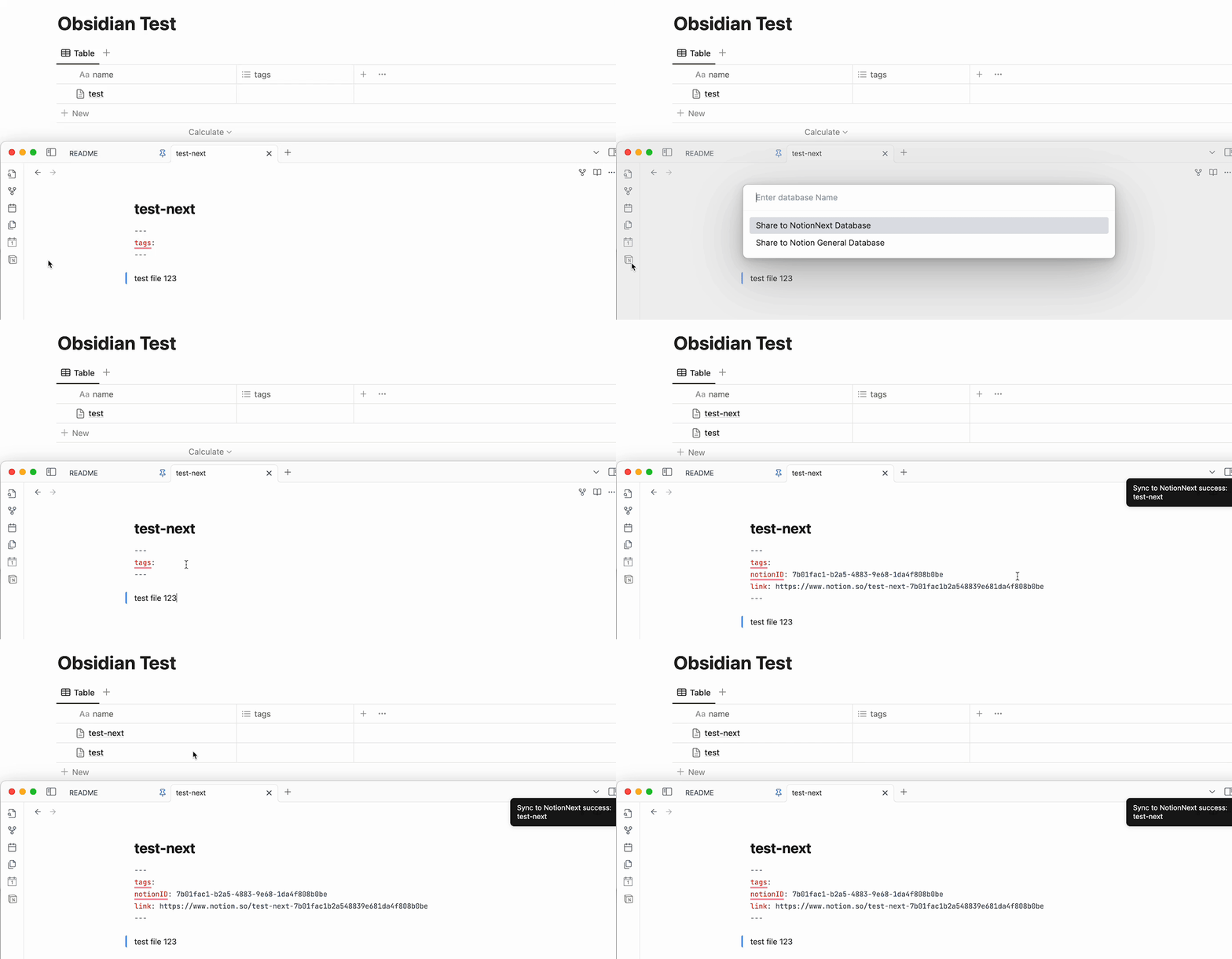
- 这个版本开始,你可以**任意修改第一列表头的名字 (标题列,默认:'title')**。 (**注意:你必须保证你的Notion数据库中有'tags‘这一列的存在,并且在markdown文件中把`tags:`添加到你的YAML表头中。否则会返回`400 错误`。但是你可以`tags:`设置为空。**)
|
||||
|
||||

|
||||

|
||||
例如这样:
|
||||

|
||||
|
||||
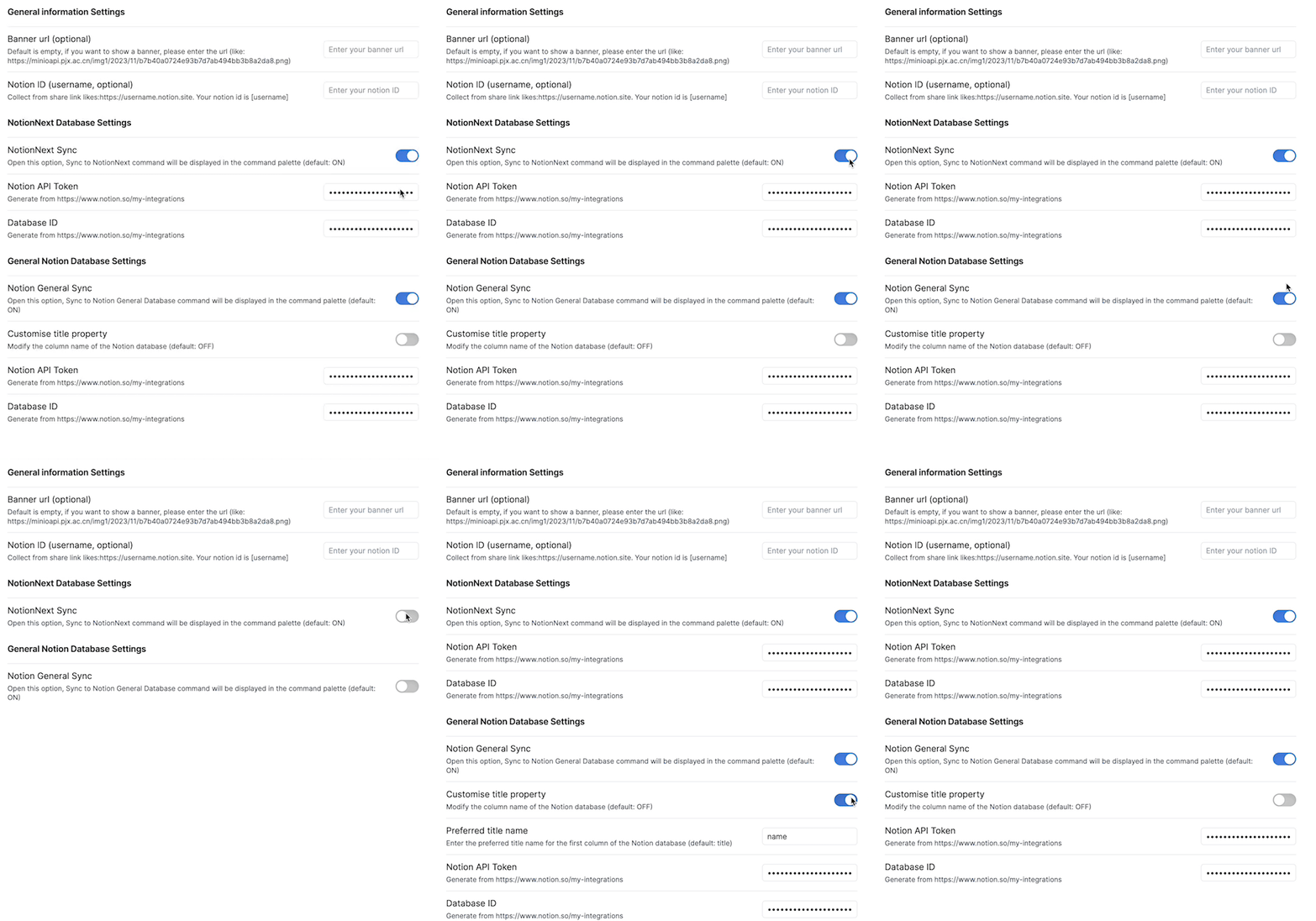
- 增加了一个控制按钮来控制是否开启当前数据库同步命令的功能。如果你关闭了这个按钮,你在上传命令列表中就不会出现当前数据库的选项。
|
||||
|
||||

|
||||
|
||||
|
||||
### 0.2.6
|
||||
|
||||
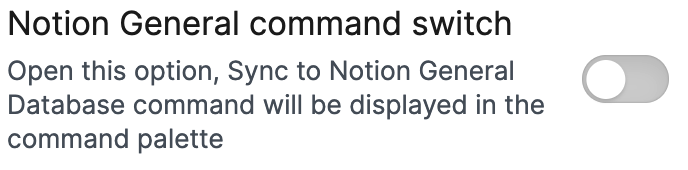
- 增加一个按钮用来控制是否在名列列表中显示如下数据库。
|
||||
|
||||

|
||||
|
||||
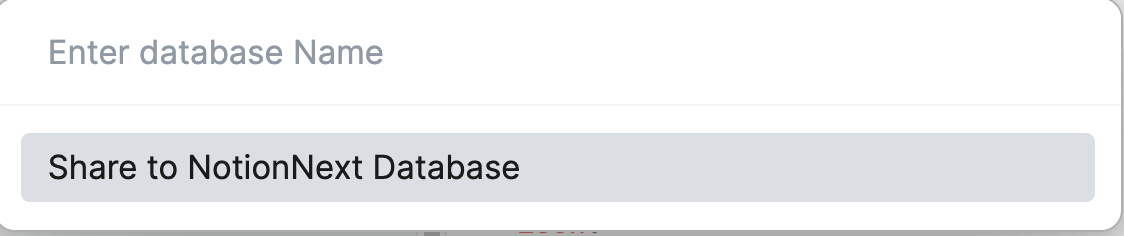
如果你关闭普通数据库的按钮,你在上传命令列表中就不会出现普通数据库的选项。如果你关闭NotionNext数据库的按钮,你在上传命令列表中就不会出现NotionNext数据库的选项。
|
||||
|
||||

|
||||
|
||||
|
||||
### 0.2.3
|
||||
|
||||
@@ -70,9 +70,9 @@ tags:
|
||||
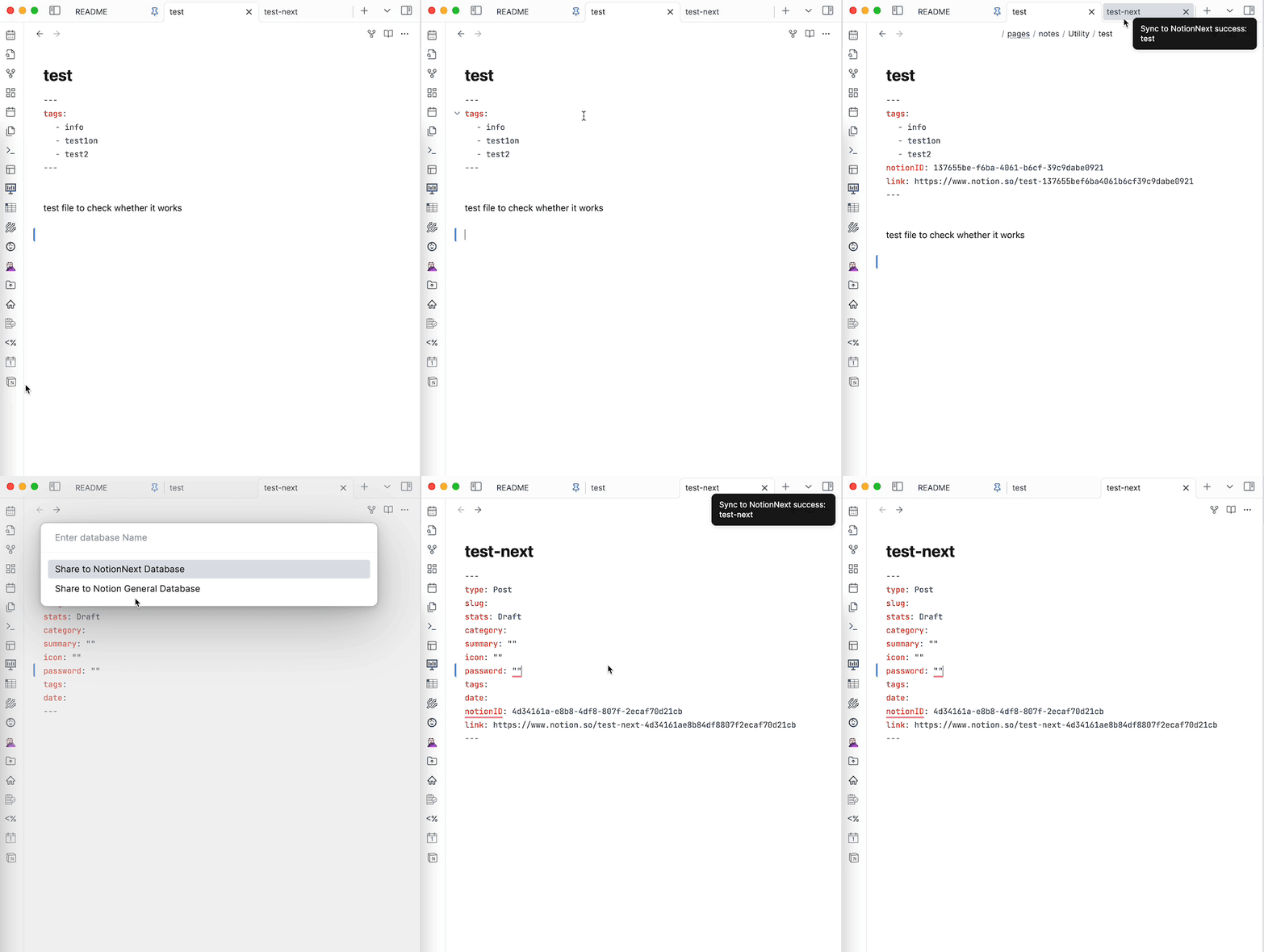
- 你可以有一个NotionNext和一个普通Notion数据库。
|
||||
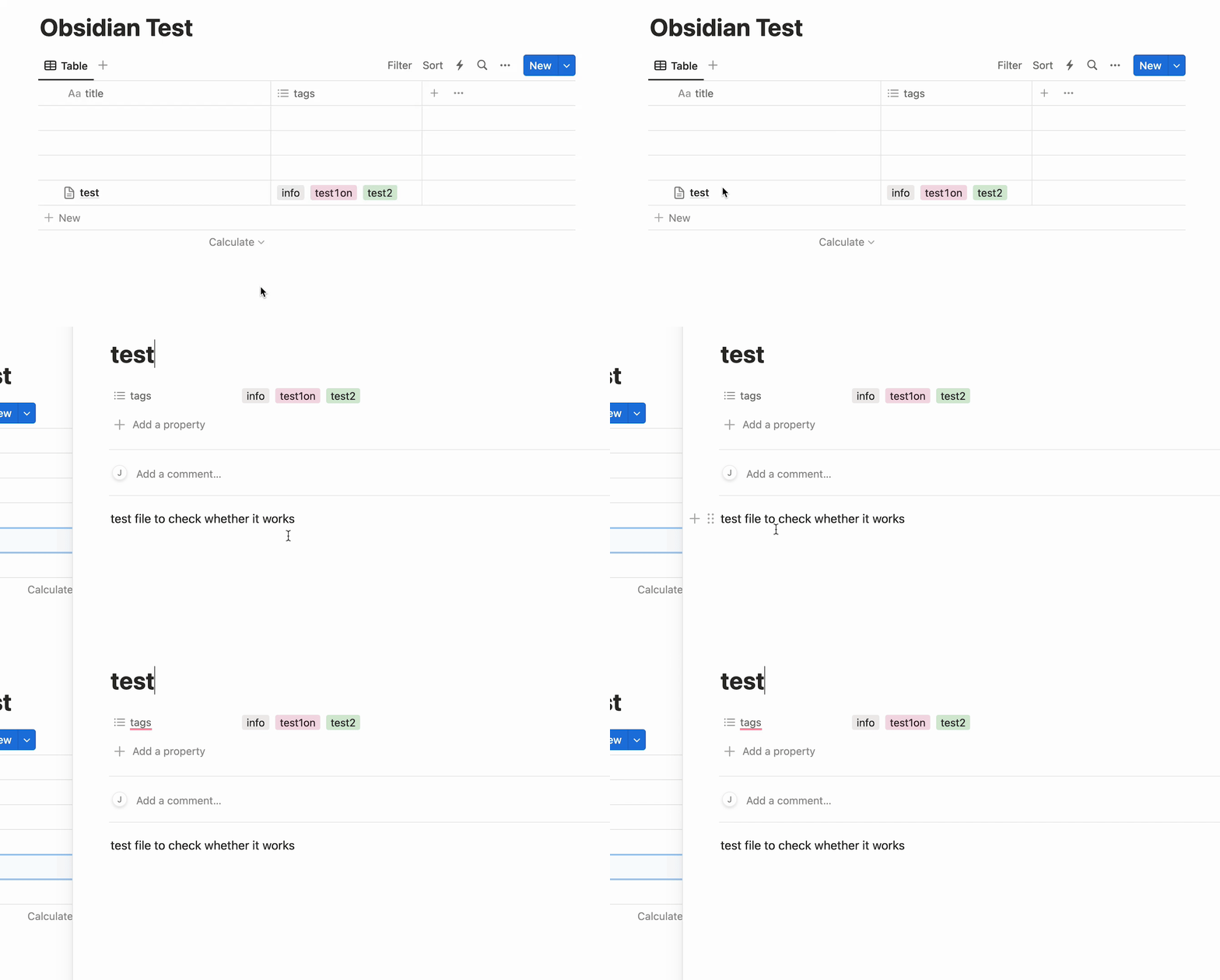
- 普通Notion数据库的同步方式和原作者的一样,只同步`title`和`tags`。**如果使用普通数据库功能,你需要保证你的数据库中有`title`和`tags`这两个表头。必须使用小写。**
|
||||
|
||||

|
||||
|
||||
|
||||

|
||||
|
||||
|
||||
### 0.2.1
|
||||
|
||||
@@ -181,10 +181,10 @@ Contents Below
|
||||
```
|
||||
|
||||
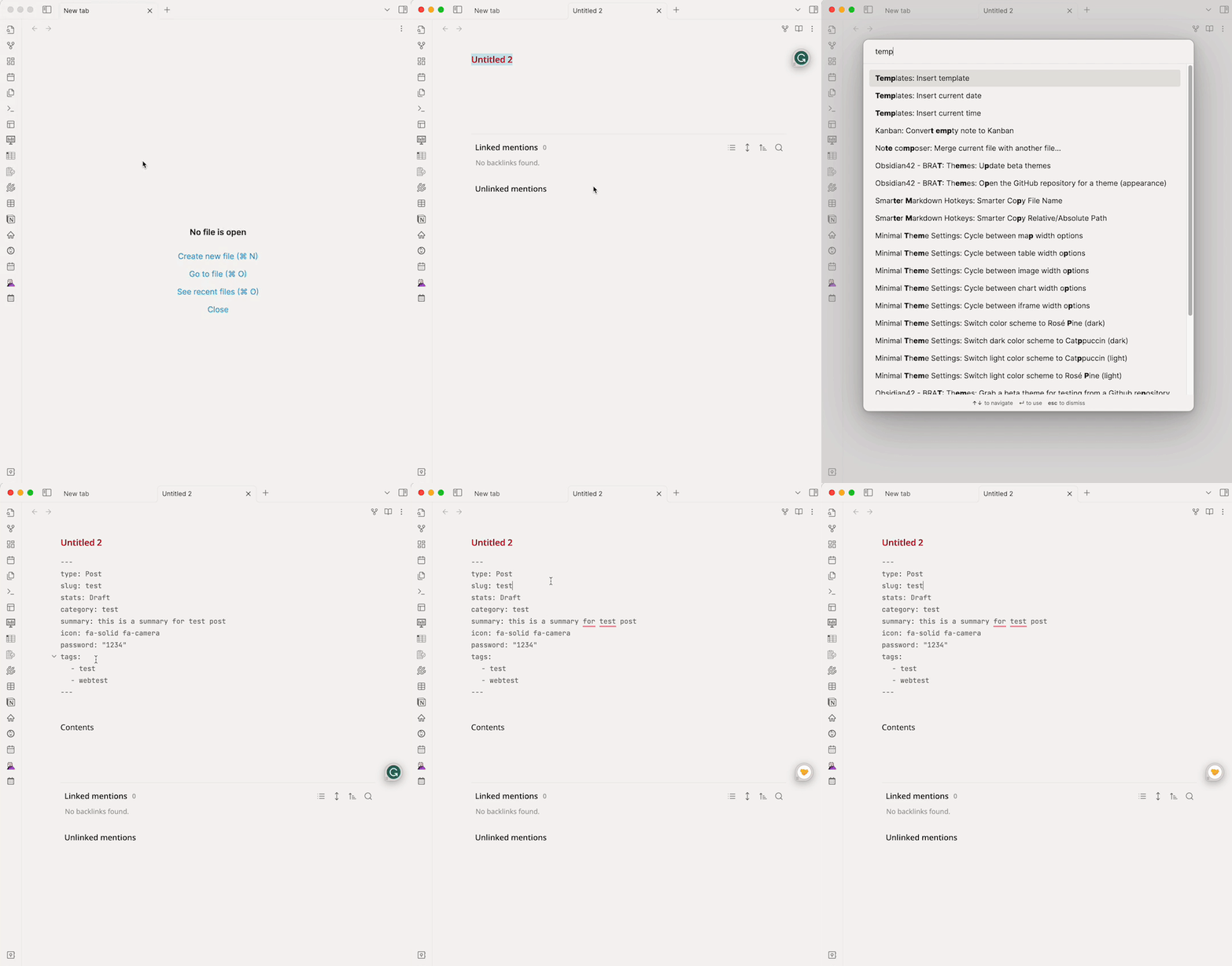
模板使用如下:
|
||||

|
||||
|
||||
|
||||
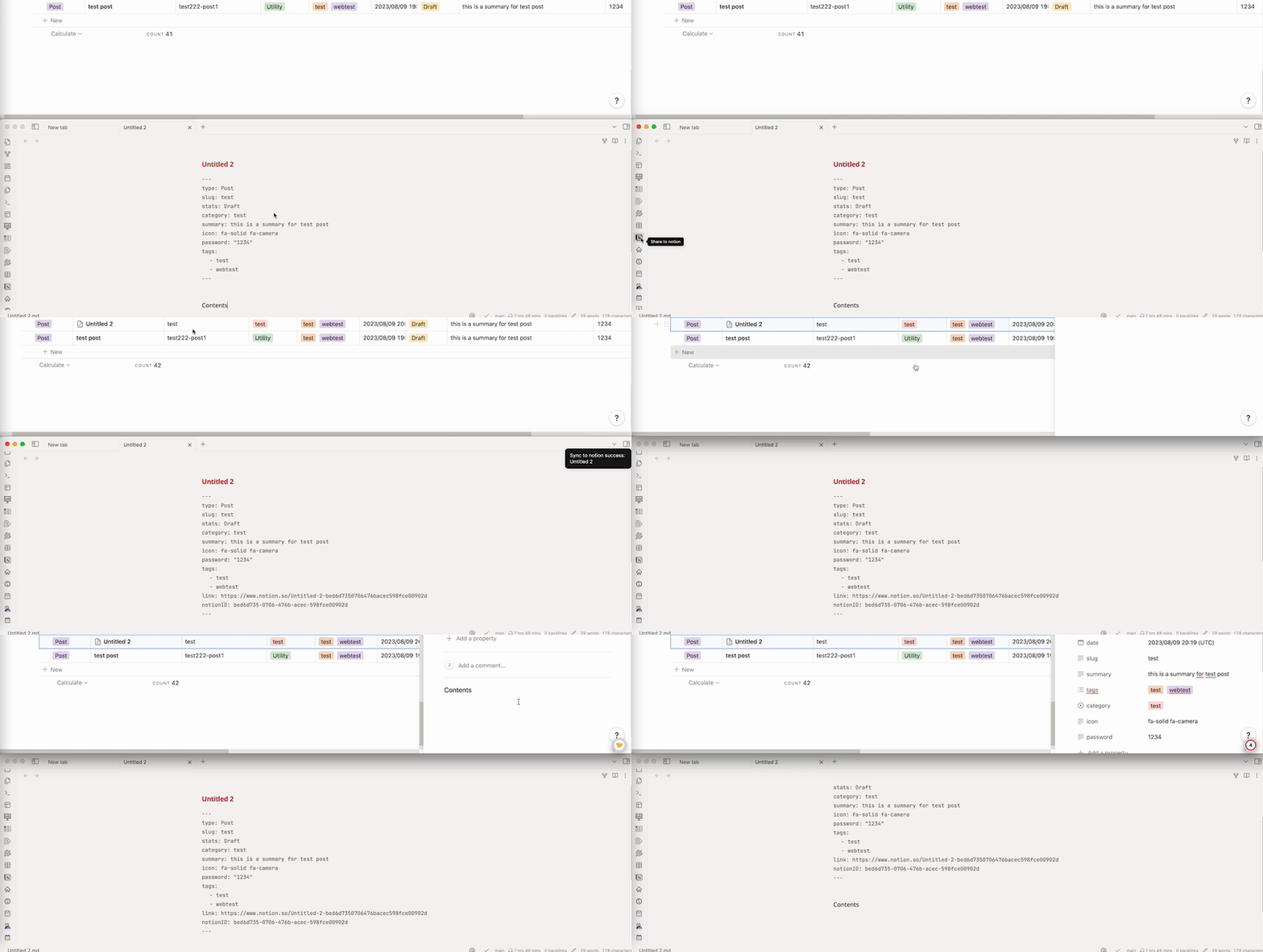
**插件预览如下**
|
||||

|
||||
|
||||
|
||||
---
|
||||
|
||||
|
||||
48
README.md
48
README.md
@@ -40,38 +40,38 @@ If you want to use this plugin, you need to follow the following steps to set up
|
||||
|
||||
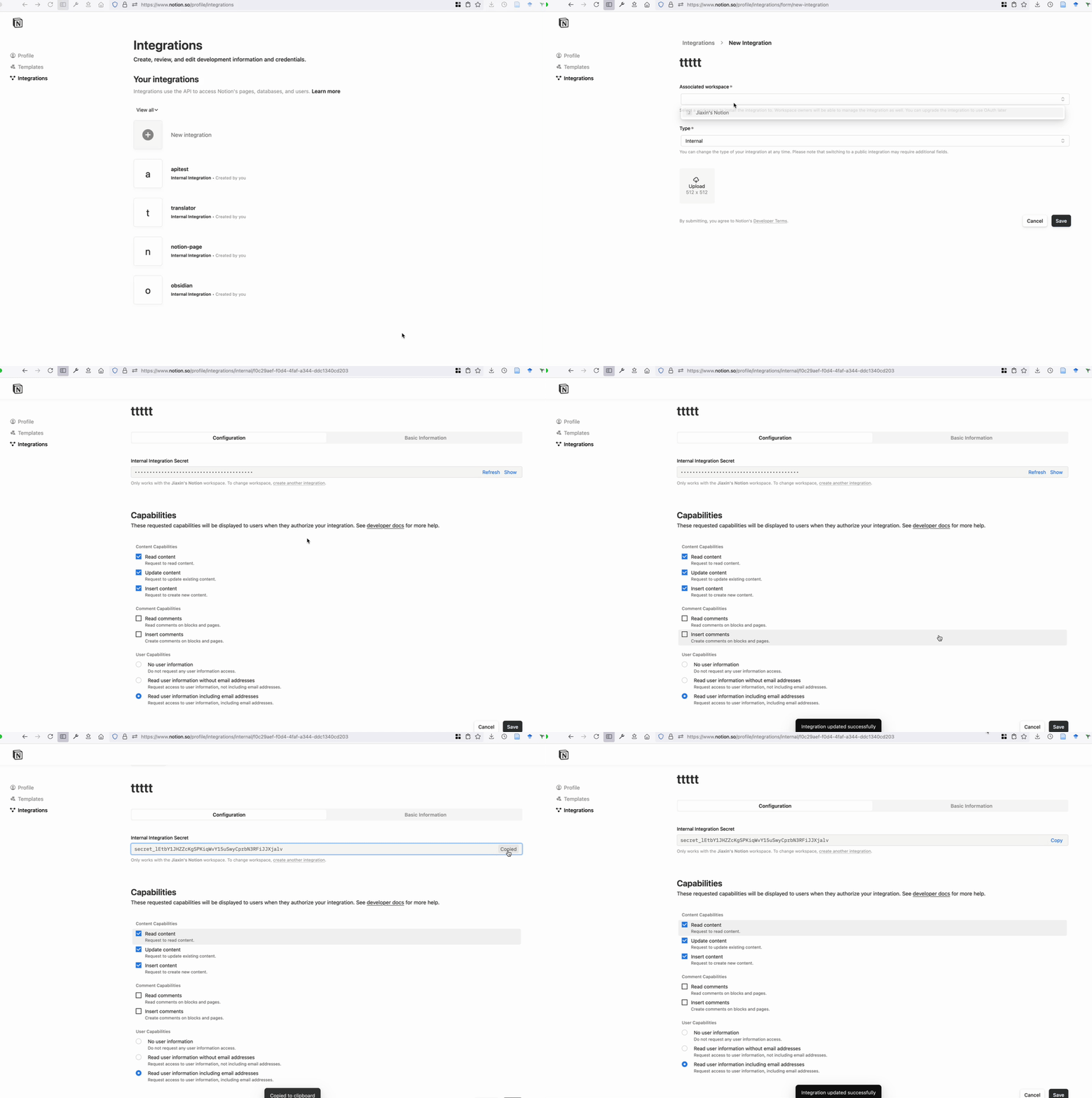
1). Go to [Notion API](https://www.notion.com/my-integrations) to create a new integration, and **copy the token**.
|
||||
|
||||

|
||||
|
||||
|
||||
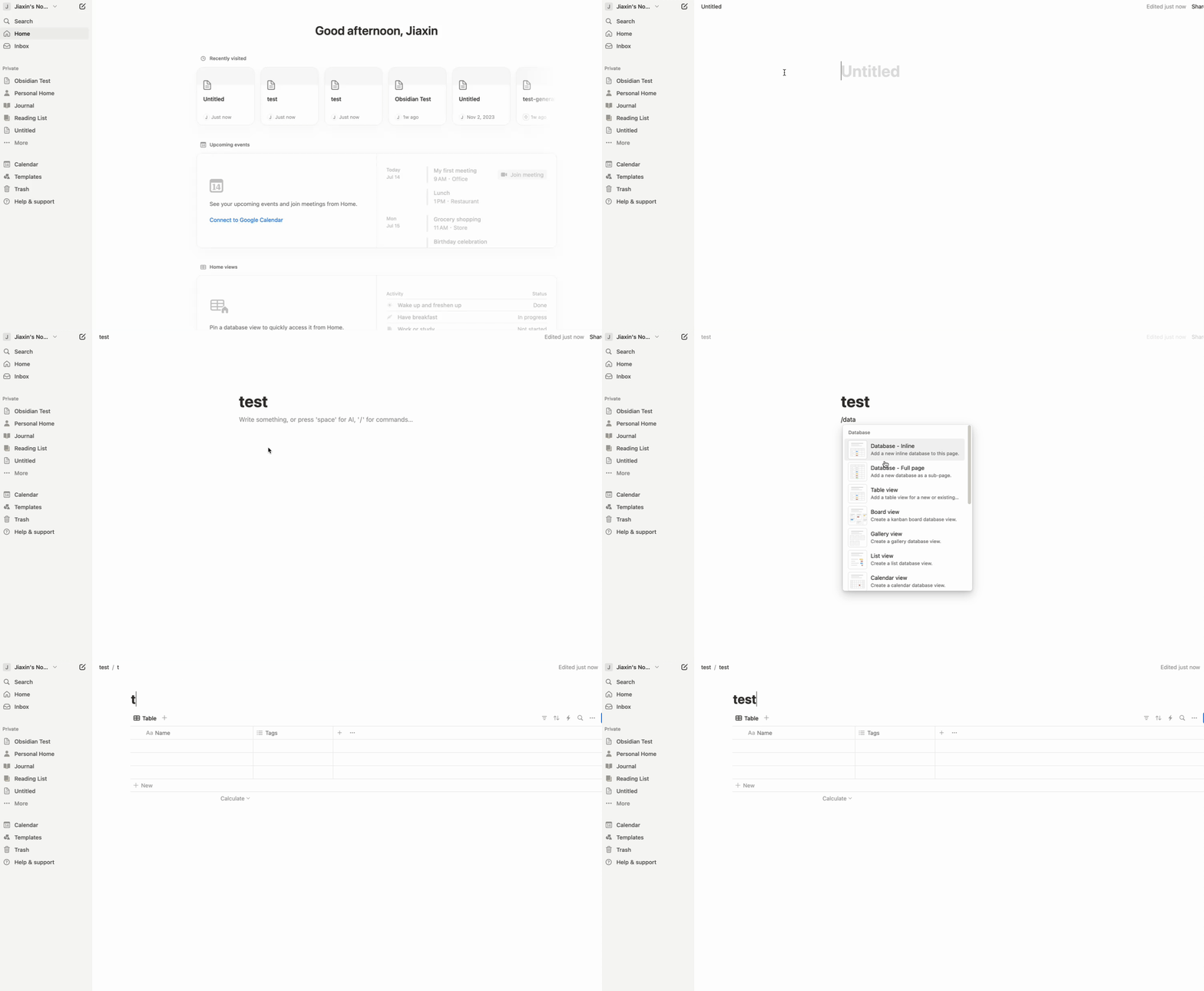
2). Create a database in your Notion workspace.
|
||||
|
||||
Open Notion, click top-left `Create` a new page` -> You can give a title for the page and press "/" Select 'Database - Full page'.
|
||||
|
||||

|
||||
|
||||
|
||||
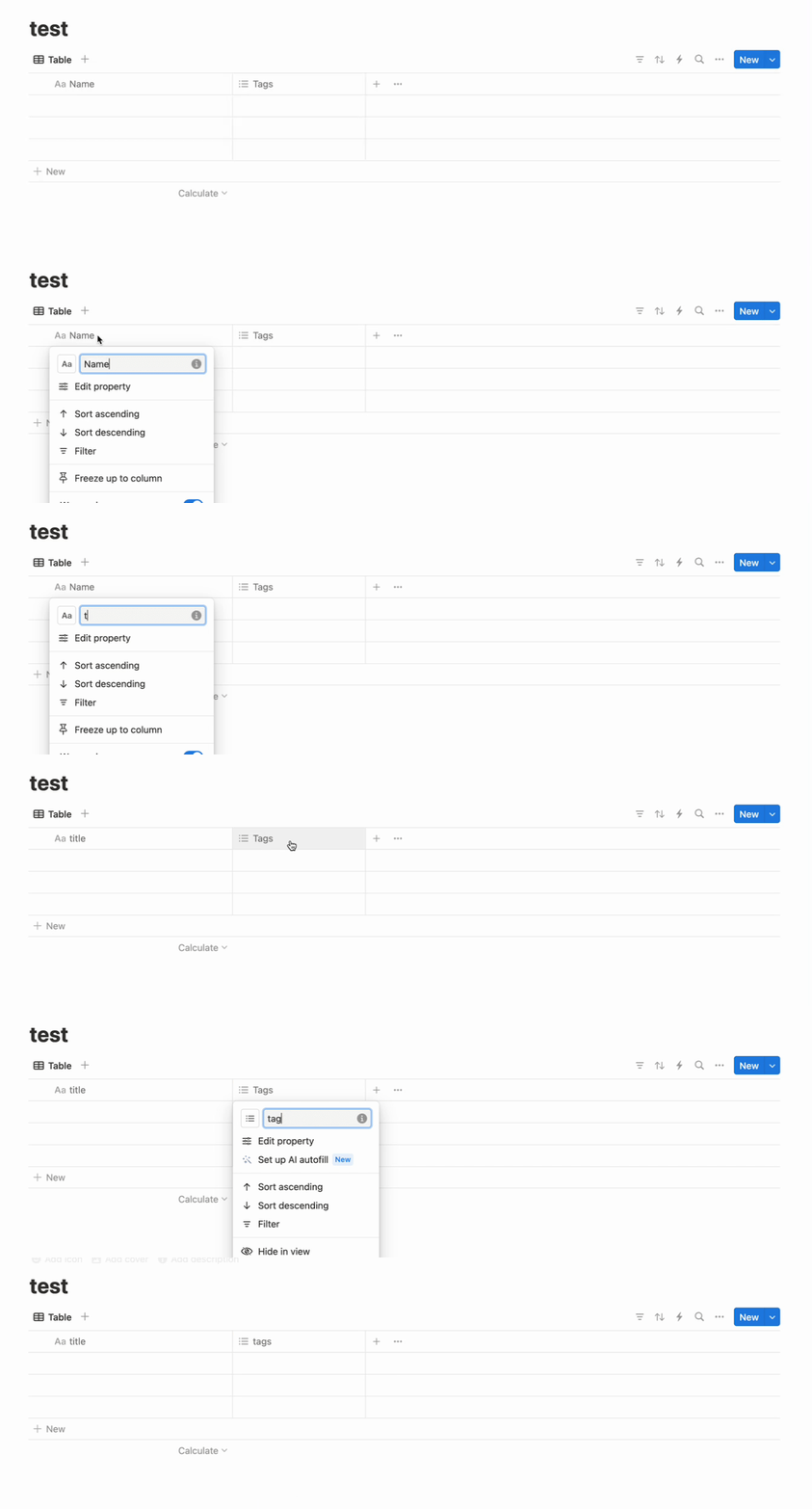
Rename the database properties to `title` and `tags`.
|
||||
**⚠️⚠️`title` is the title column! `tags` is lower case⚠️⚠️**
|
||||
|
||||

|
||||
|
||||
|
||||
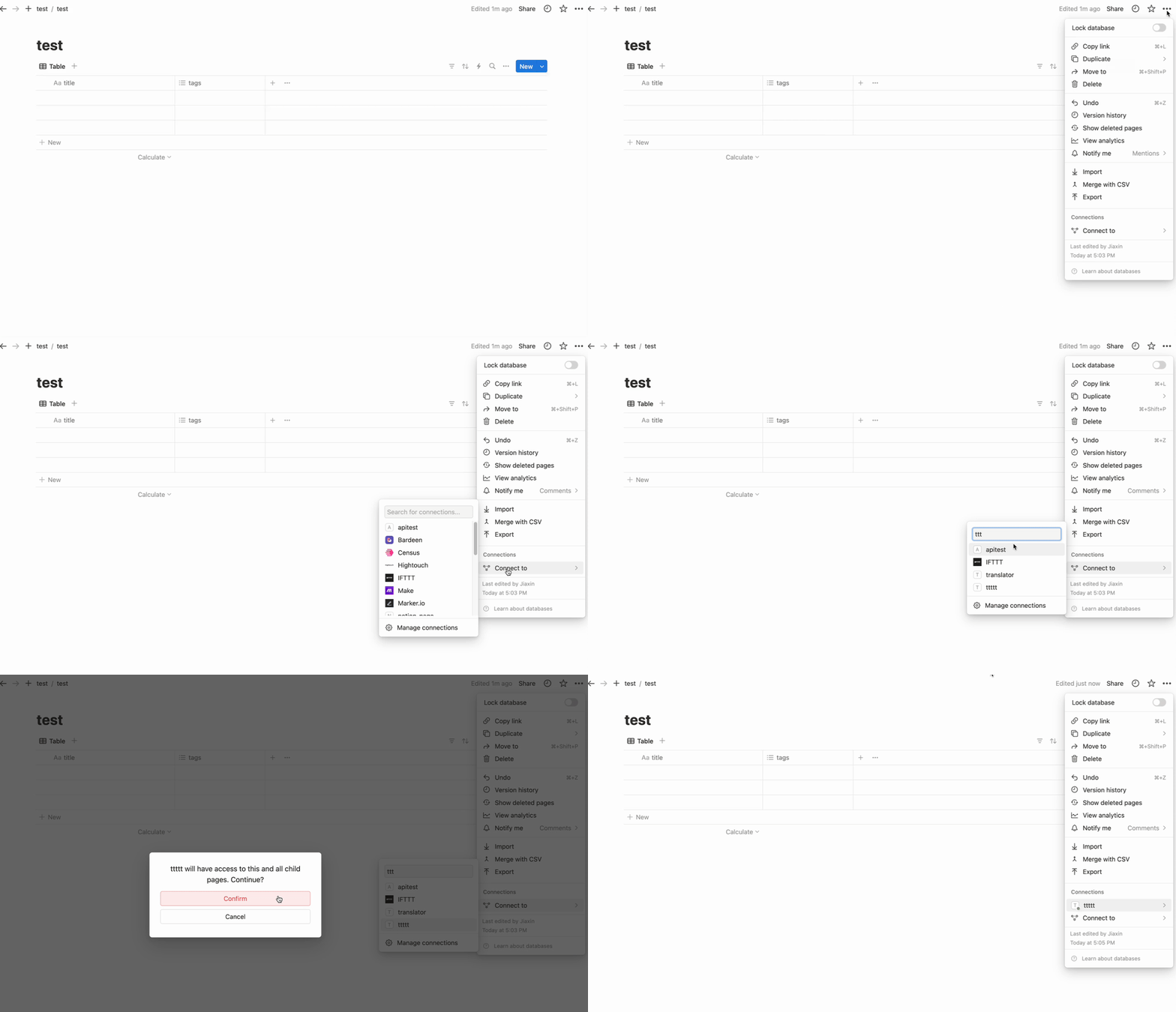
3). Add the Notion API integration.
|
||||
|
||||
Click the right-top '...' -> connections -> connect to -> find the integration you created and connect it.
|
||||
|
||||

|
||||
|
||||
|
||||
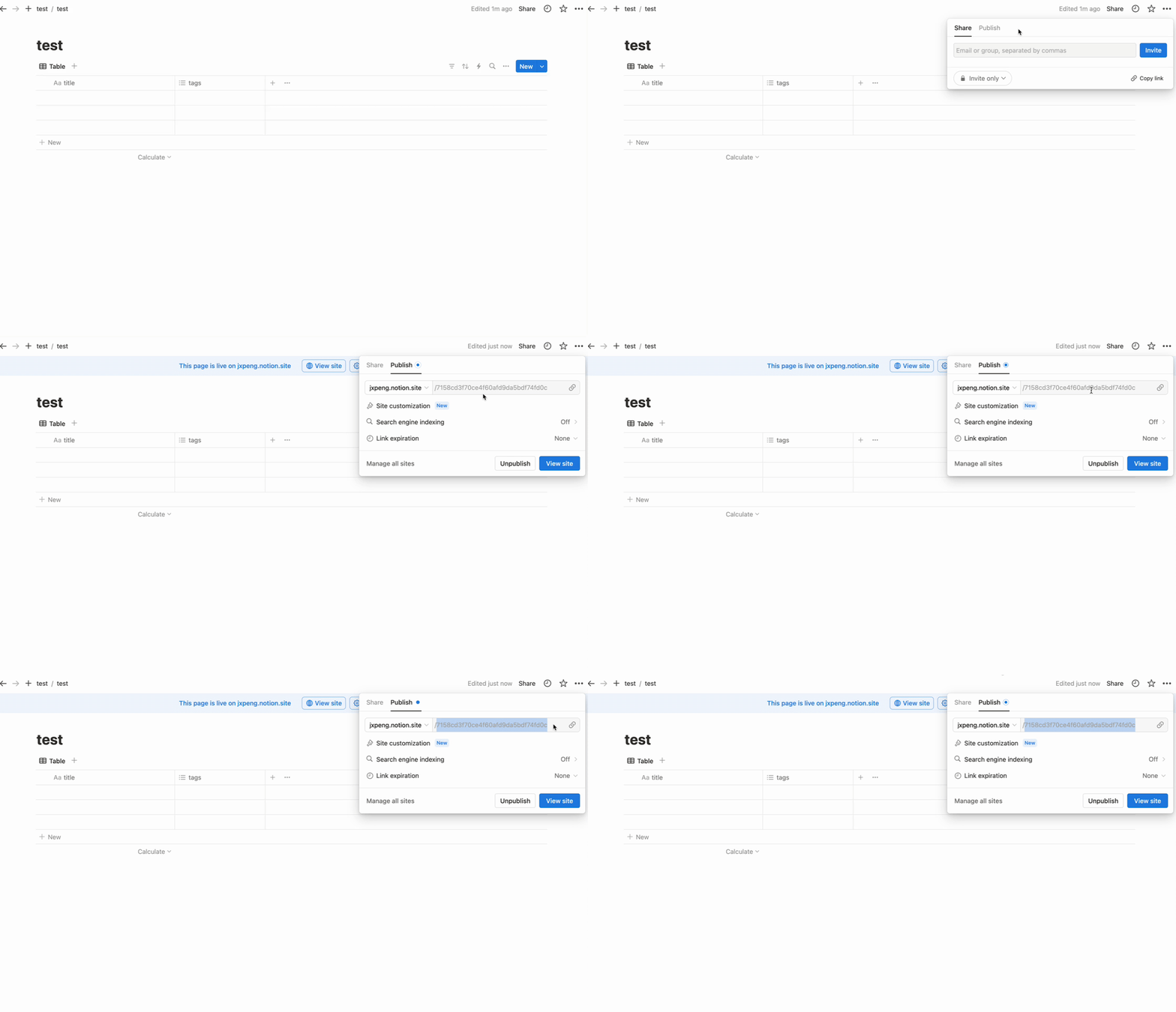
4). Publish the database to the public.
|
||||
Click the 'Share' -> 'Publish' -> 'Publish' -> **copy the database id from the URL**.
|
||||
|
||||

|
||||
|
||||
|
||||
### 2. Setting up the plugin in Obsidian
|
||||
|
||||
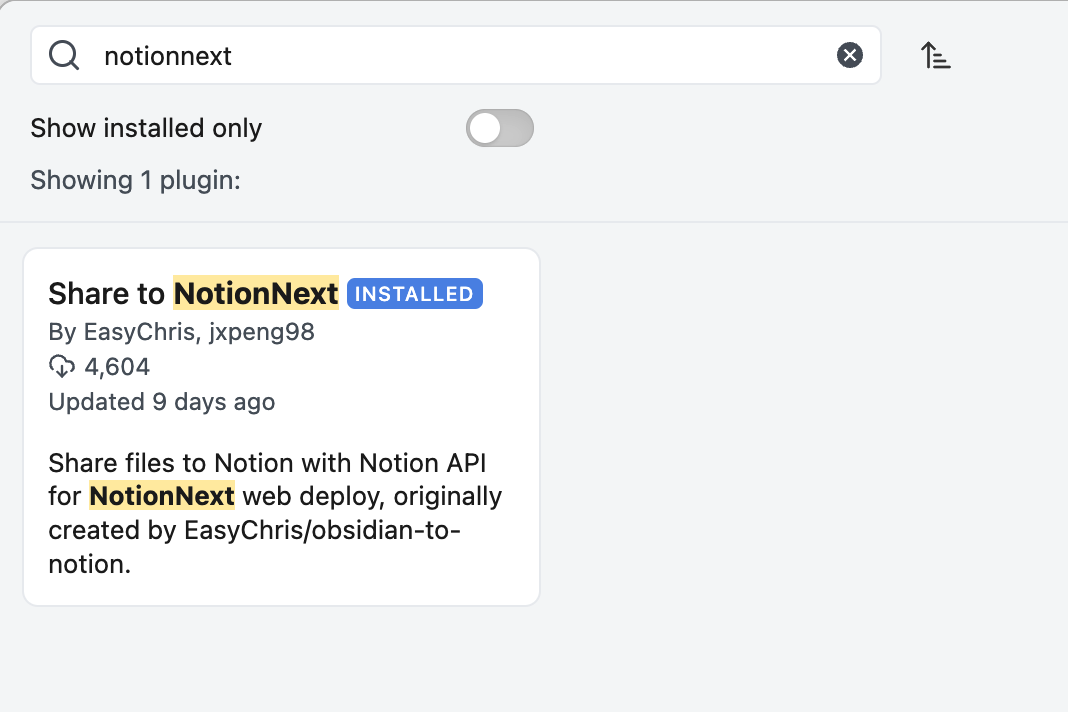
1). Go to Obsidian settings -> community plugins -> search 'NotionNext' -> install it.
|
||||

|
||||
|
||||
|
||||
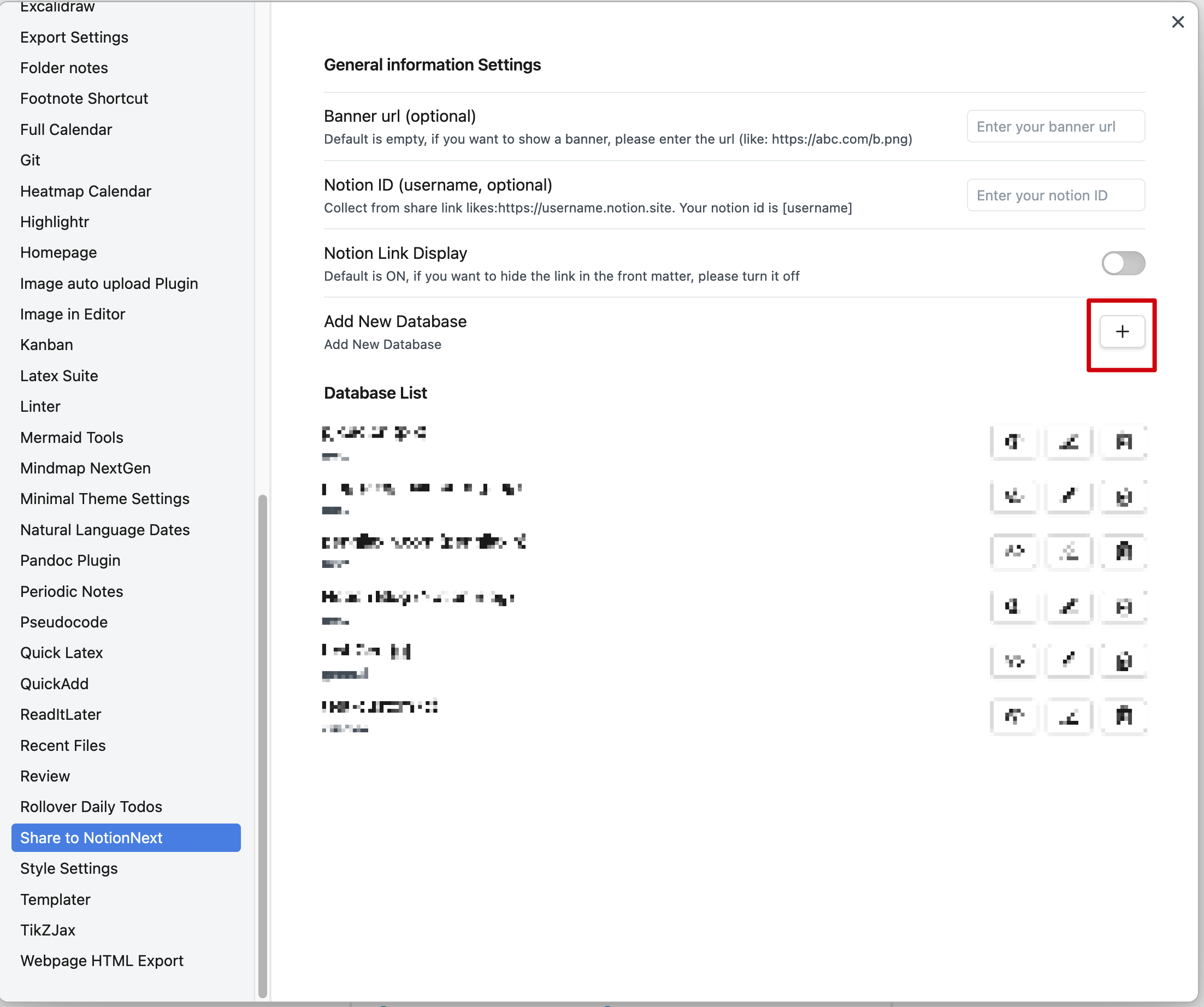
2). Open the plugin settings and create a new database.
|
||||
|
||||

|
||||
|
||||
|
||||
### 3. Create a database
|
||||
|
||||
@@ -81,7 +81,7 @@ Click the 'Share' -> 'Publish' -> 'Publish' -> **copy the database id from the U
|
||||
|
||||
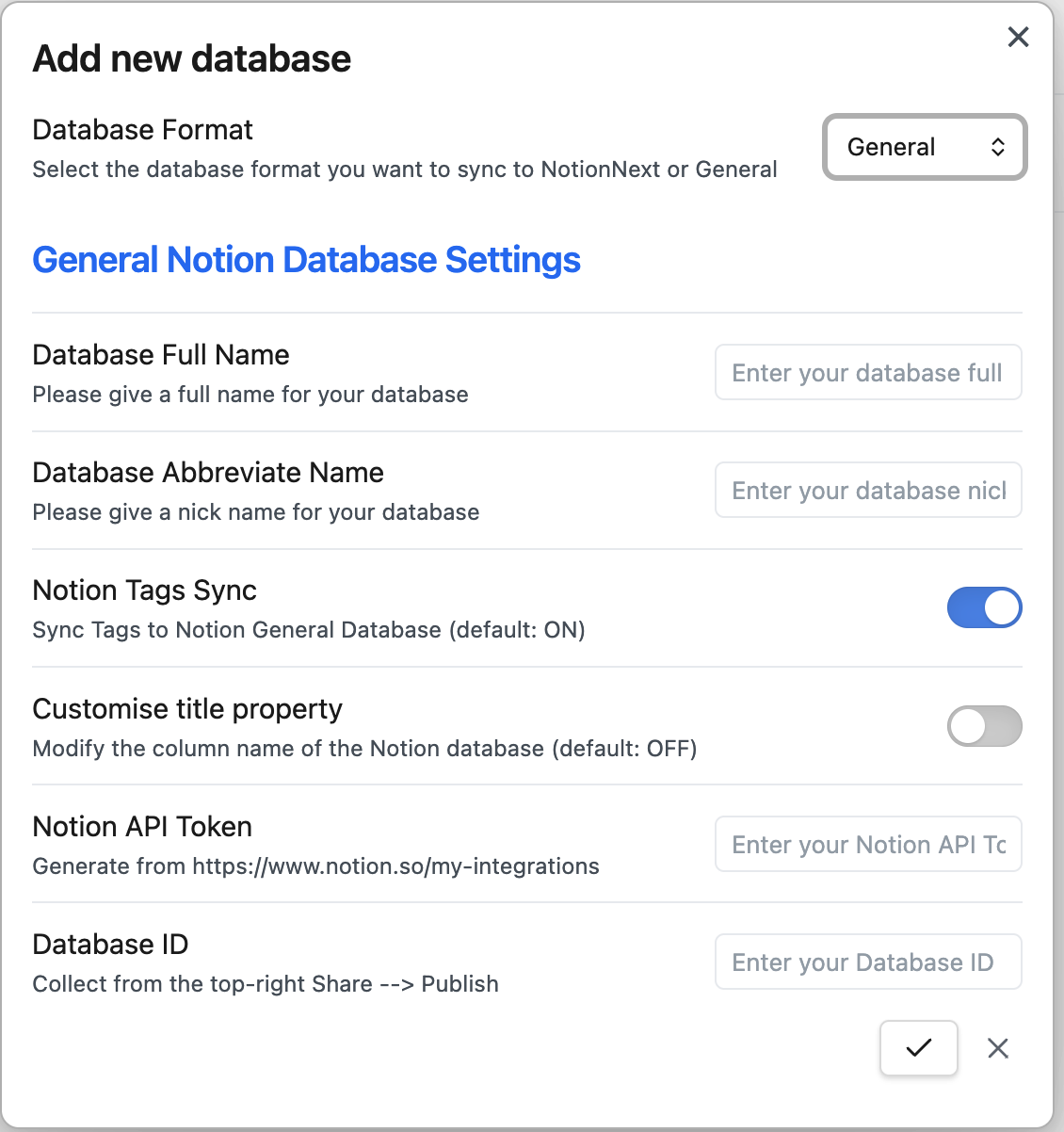
General database is the default database, which only has the `title` and `tags` columns. **⚠️⚠️`title` and `tags` are lowercase⚠️⚠️**
|
||||
|
||||

|
||||
|
||||
|
||||
The general is as follows:
|
||||
|
||||
@@ -94,17 +94,17 @@ The general is as follows:
|
||||
|
||||
After setting, it should look like this:
|
||||
|
||||

|
||||
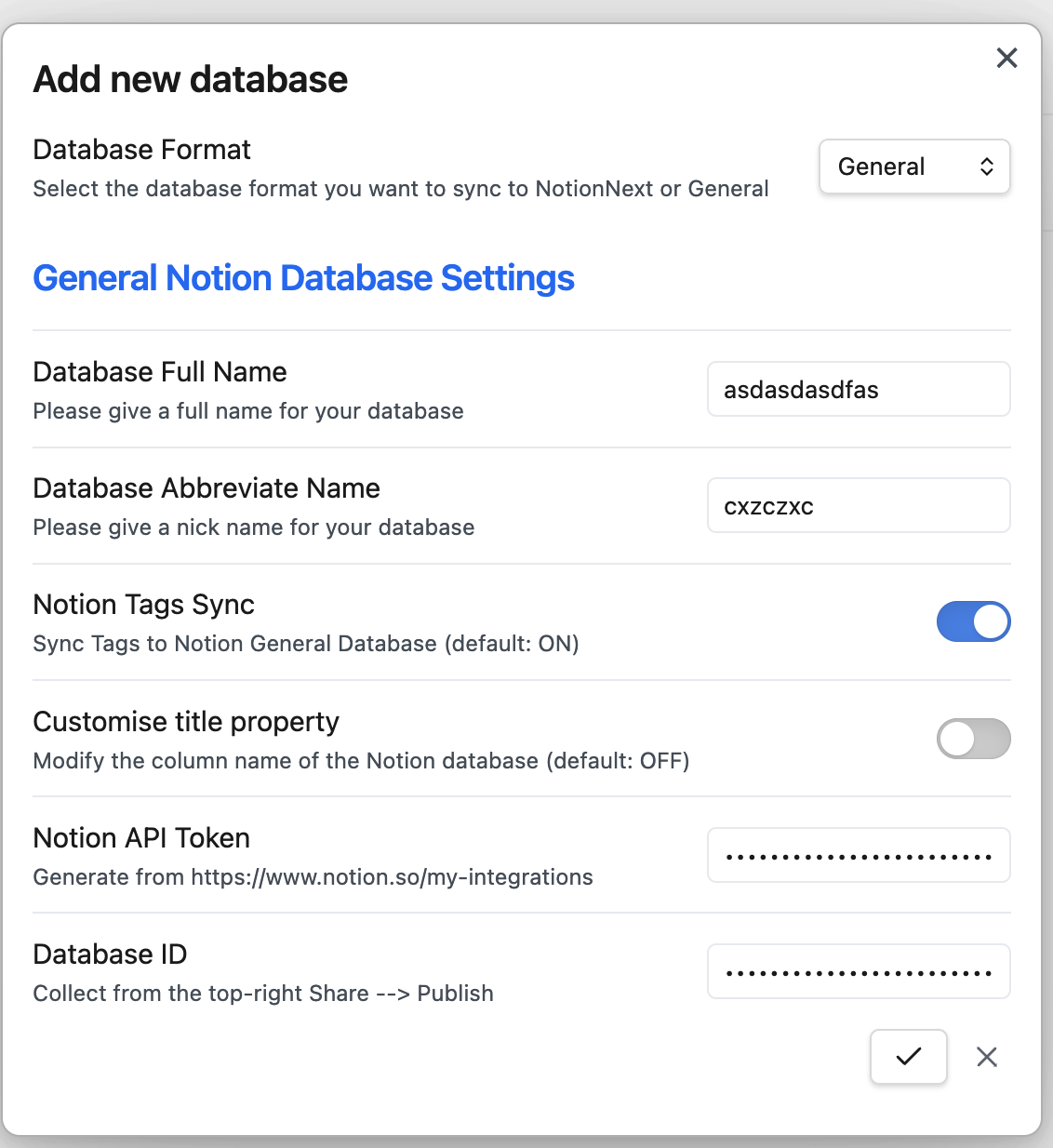
|
||||
|
||||
Once you click `save`, the new database will be created in the plugin settings and display in the detabase list.
|
||||
|
||||

|
||||

|
||||
|
||||
#### 2️⃣ NotionNext database
|
||||
|
||||
If you use [NotionNext](https://github.com/tangly1024/NotionNext) to set up your website, you can use the NotionNext database. (**All the properties are in lowercase, and you do not need to change the properties**)
|
||||
|
||||

|
||||
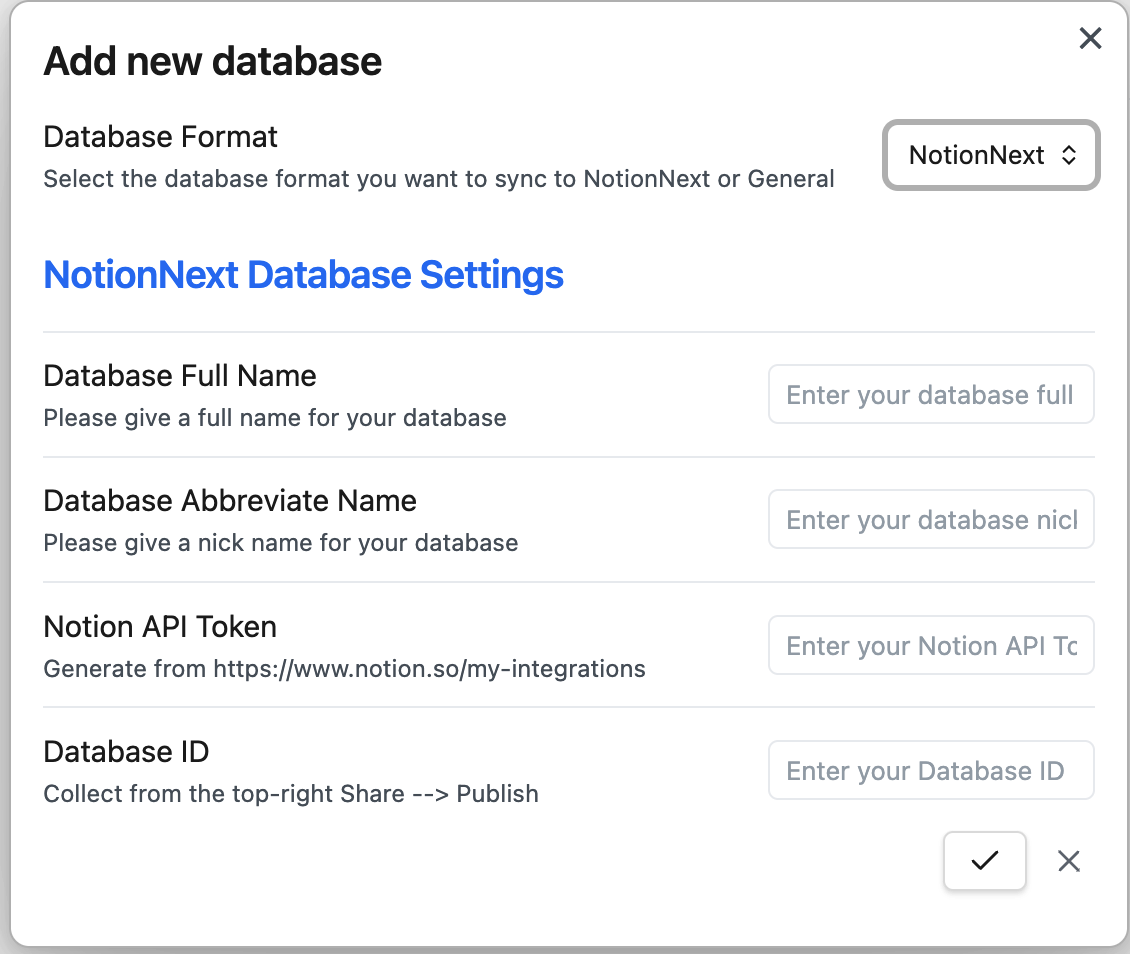
|
||||
|
||||
Like the general database, you need to fill in the following information:
|
||||
|
||||
@@ -117,7 +117,7 @@ Like the general database, you need to fill in the following information:
|
||||
|
||||
The custom database is purely customised, and you can customise the properties you want to sync. (**All the properties are in lowercase, and you do not need to change the properties**)
|
||||
|
||||

|
||||
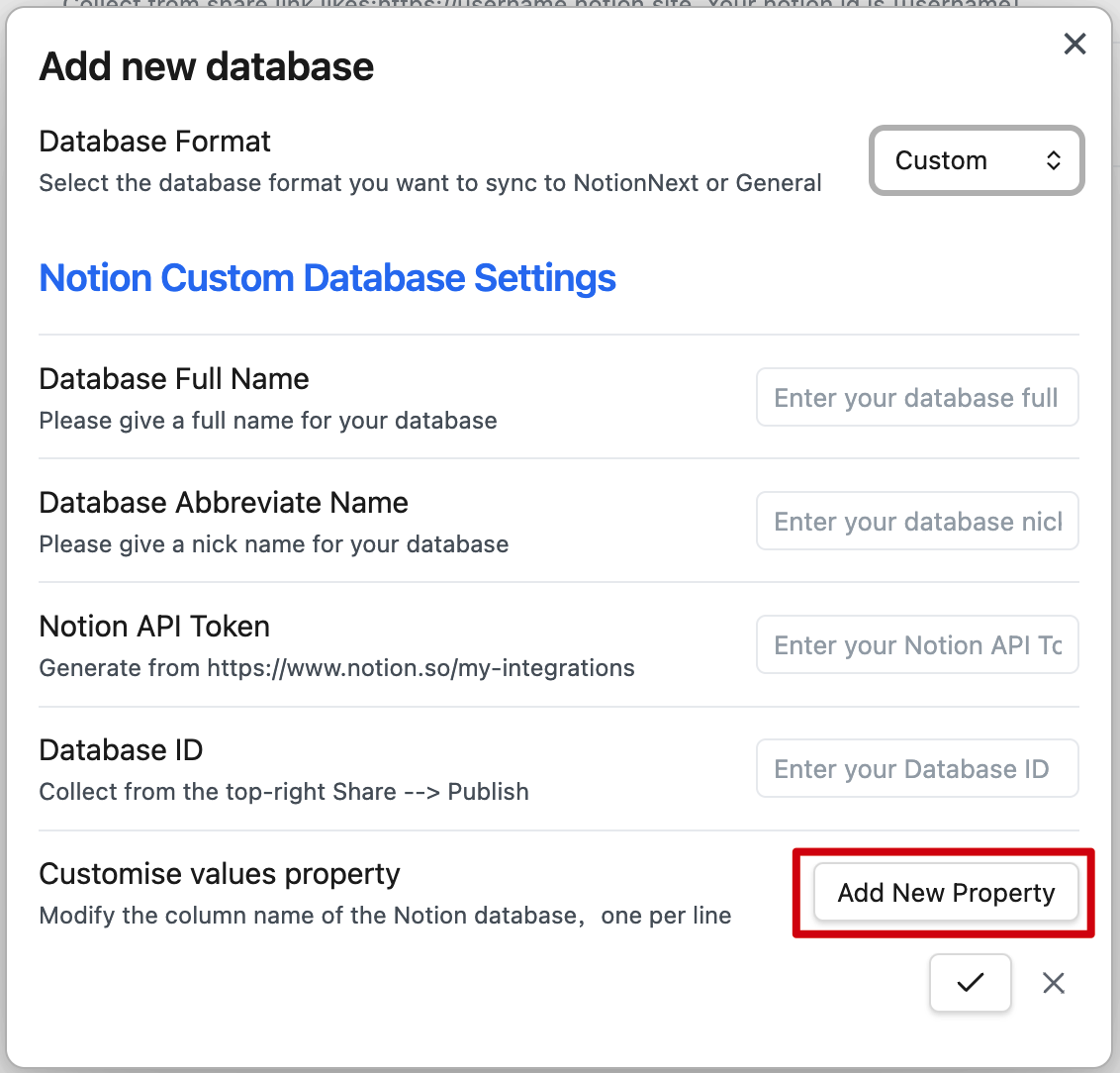
|
||||
|
||||
The basic information is identical to the general database and NotionNext database. You need to fill in the following information:
|
||||
|
||||
@@ -128,15 +128,15 @@ The basic information is identical to the general database and NotionNext databa
|
||||
|
||||
After adding the information, You can click `Add New Property` to add the properties you want to sync. There is no limit to the number of properties you can add.
|
||||
|
||||

|
||||
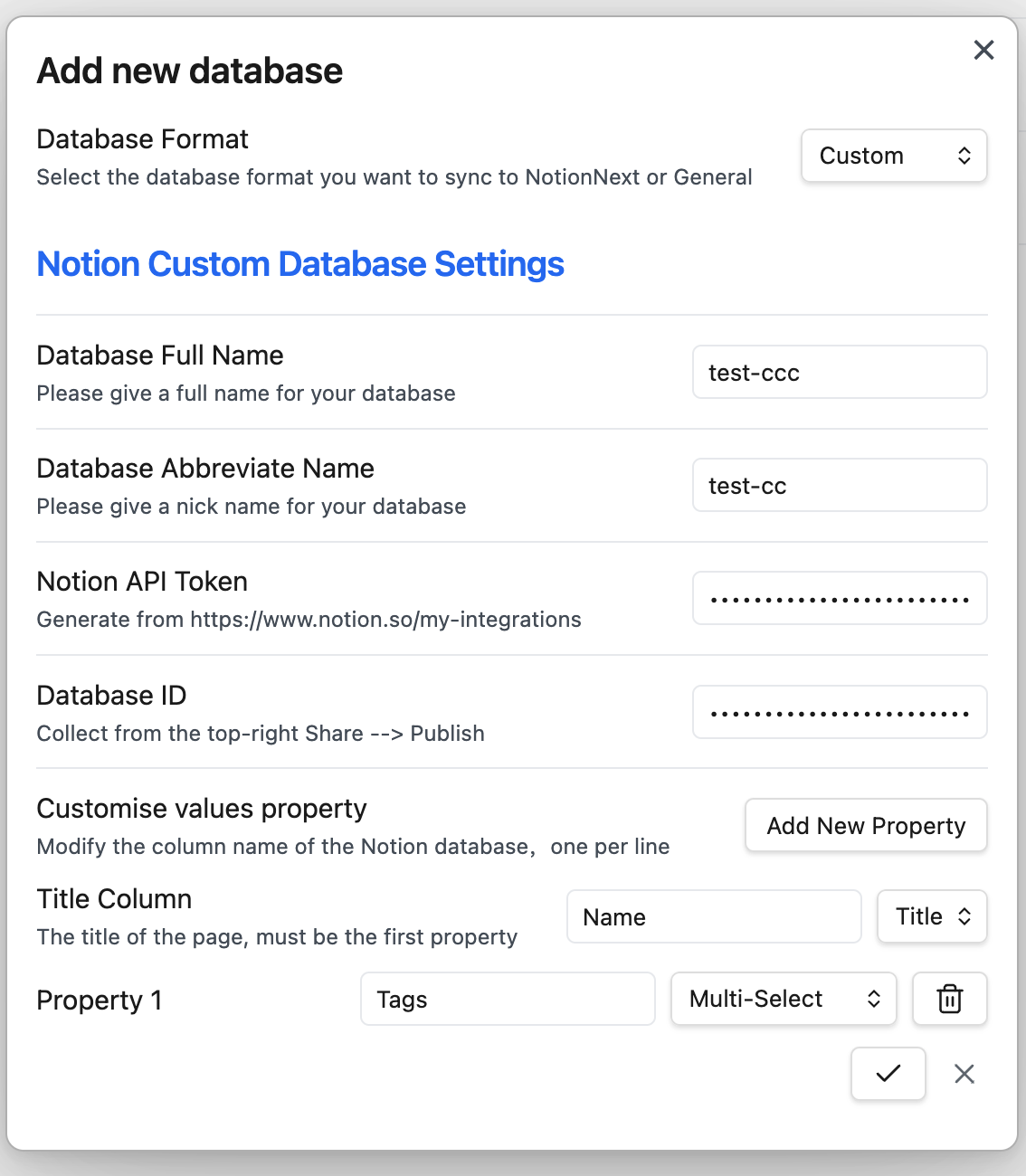
|
||||
|
||||
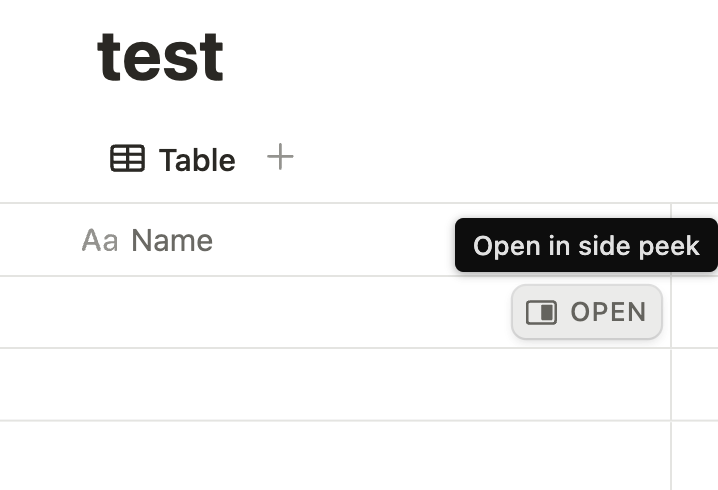
**⚠️⚠️⚠️**: **`Title column` is the main property in the Notion database, which has the open button to open the underlying page.** You can select the type of all other properties. **⚠️⚠️⚠️**
|
||||
|
||||

|
||||
|
||||
|
||||
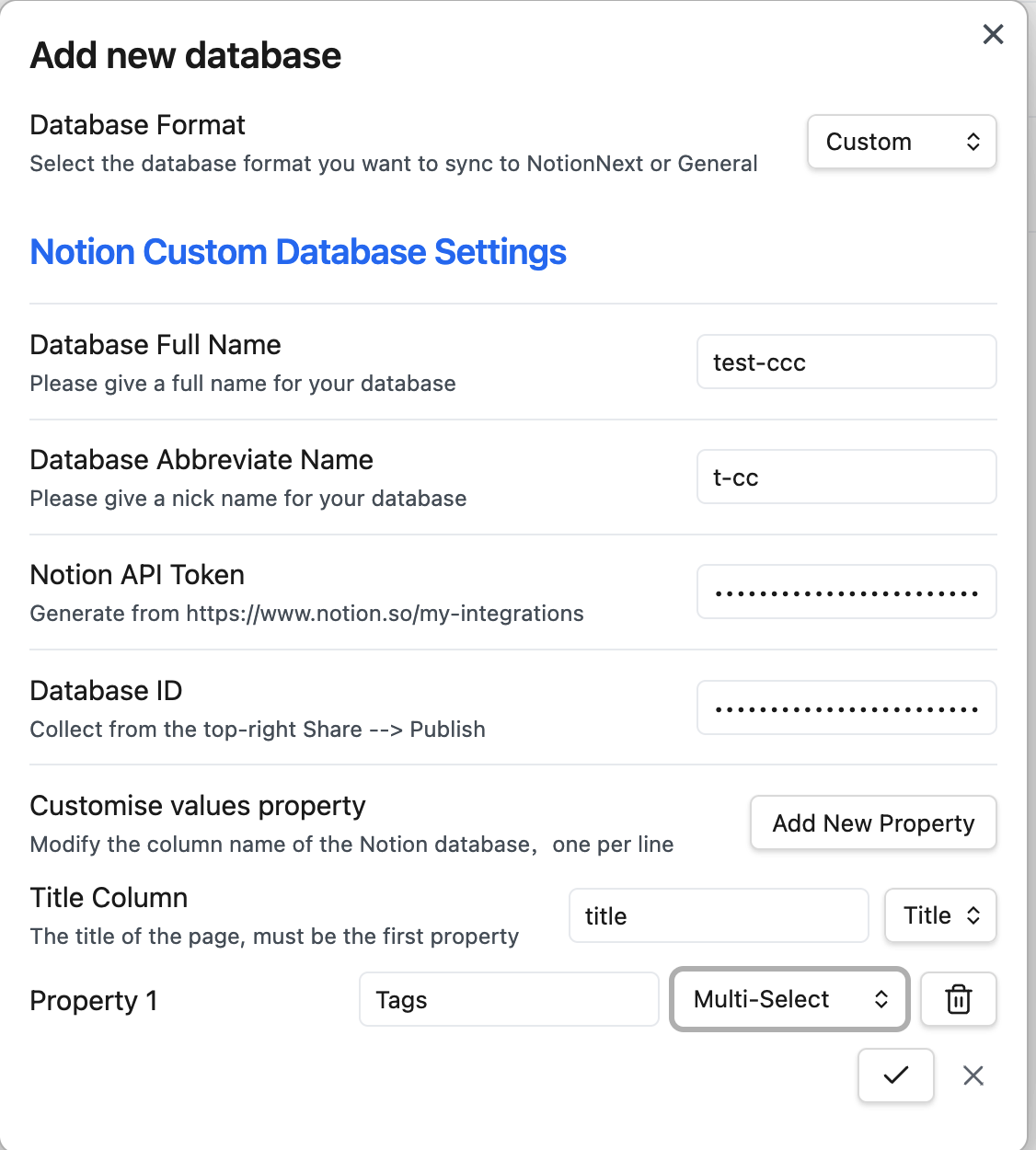
According to the previously shown database, you can use `title` as the `Title column`, and `Tags` as the property 1.
|
||||
|
||||

|
||||
|
||||
|
||||
**Until now, you have set up the plugin in Obsidian. You can start syncing your notes to Notion.**
|
||||
|
||||
@@ -160,7 +160,7 @@ This is a test file.
|
||||
|
||||
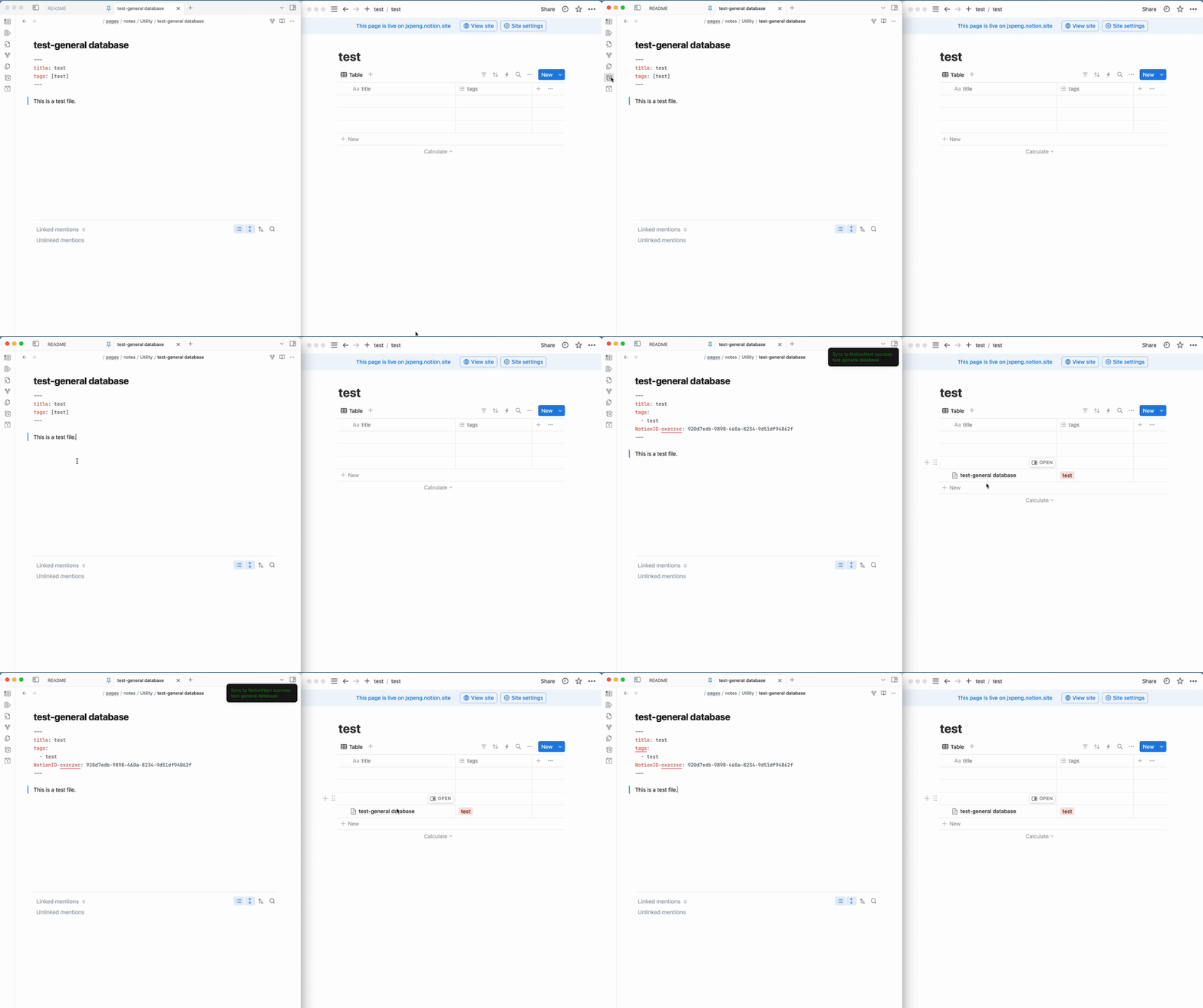
After creating the note, you can click the `Share to NotionNext` button on the left sidebar to sync the note to Notion.
|
||||
|
||||

|
||||
|
||||
|
||||
#### 2️⃣ note for NotionNext database
|
||||
|
||||
@@ -188,7 +188,7 @@ NotionID-pengjiaxin: 8ba573de-8fdf-4681-b063-c39d26e7860e
|
||||
this is a test file
|
||||
```
|
||||
|
||||

|
||||
|
||||
|
||||
#### 3️⃣ note for custom database
|
||||
|
||||
@@ -196,7 +196,7 @@ this is a test file
|
||||
|
||||
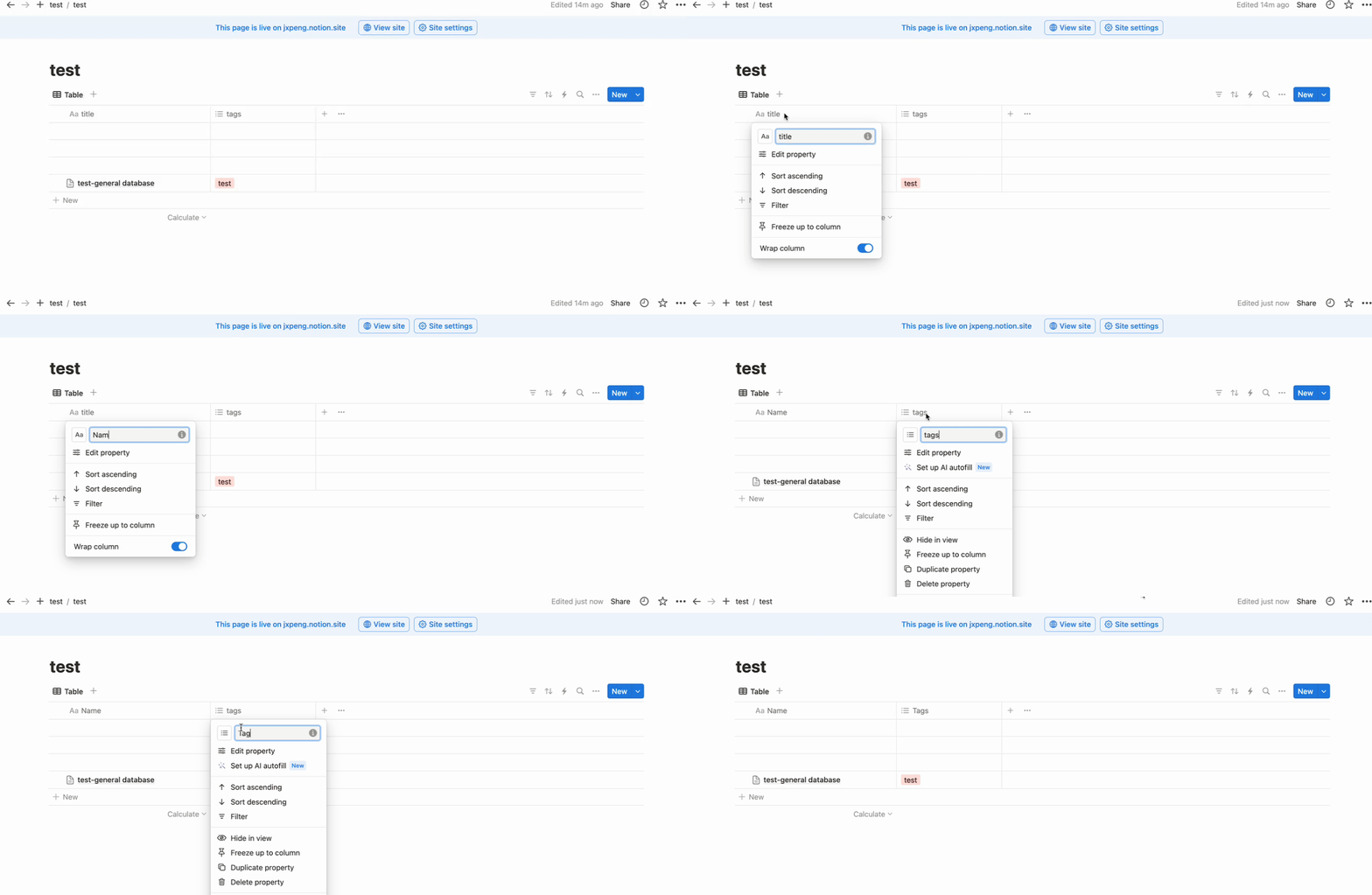
Use the previously created general database and rename `title` to `Name` and `tags` to `Tags` in Notion.
|
||||
|
||||

|
||||
|
||||
|
||||
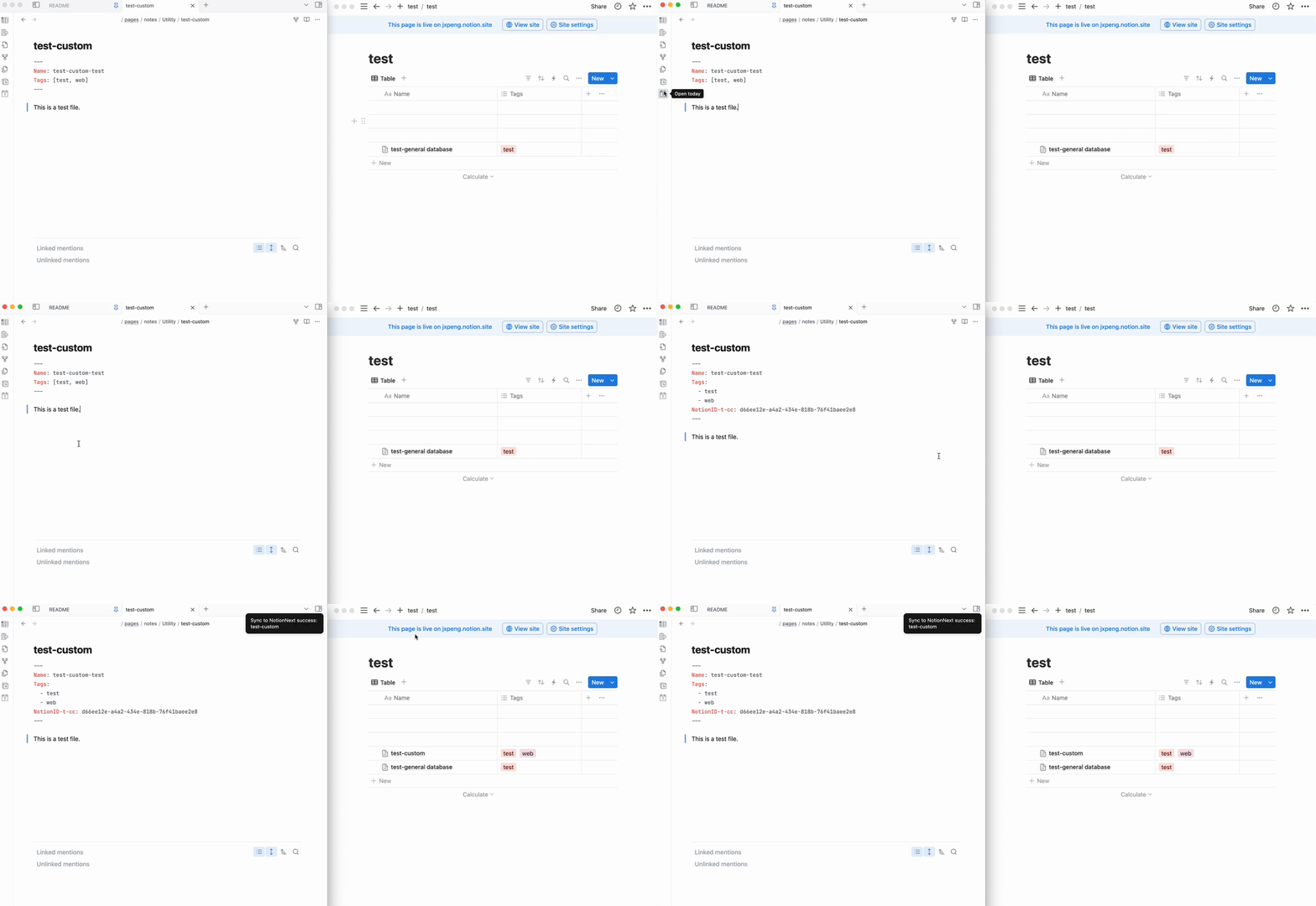
The front matter for the custom database is as follows:
|
||||
|
||||
@@ -211,23 +211,23 @@ Tags:
|
||||
This is a test file.
|
||||
```
|
||||
|
||||

|
||||
|
||||
|
||||
##### sync more properties
|
||||
|
||||
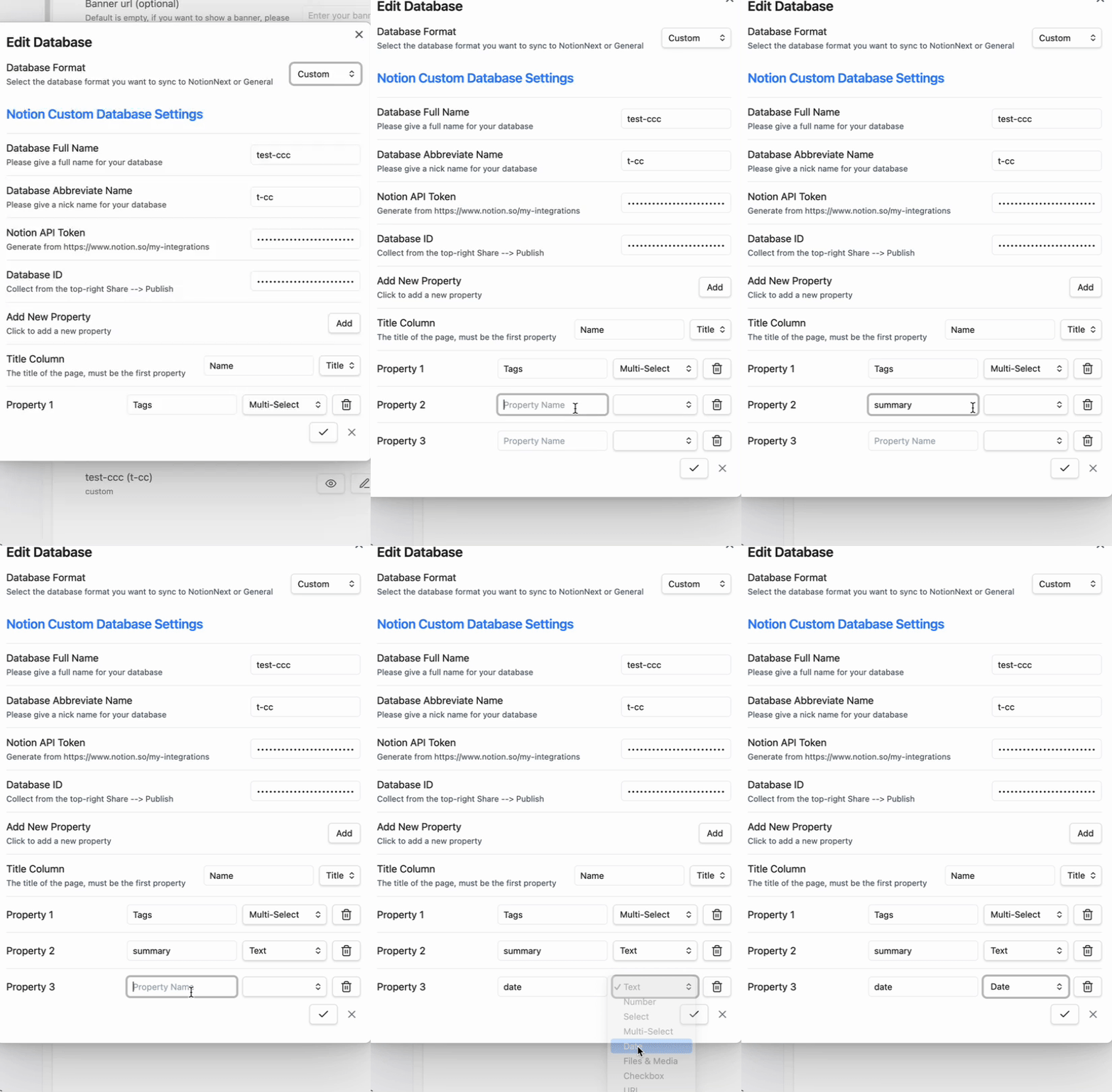
Add more property to the custom database. For example, we can add a `summary` and `date` property to the custom database.
|
||||
|
||||
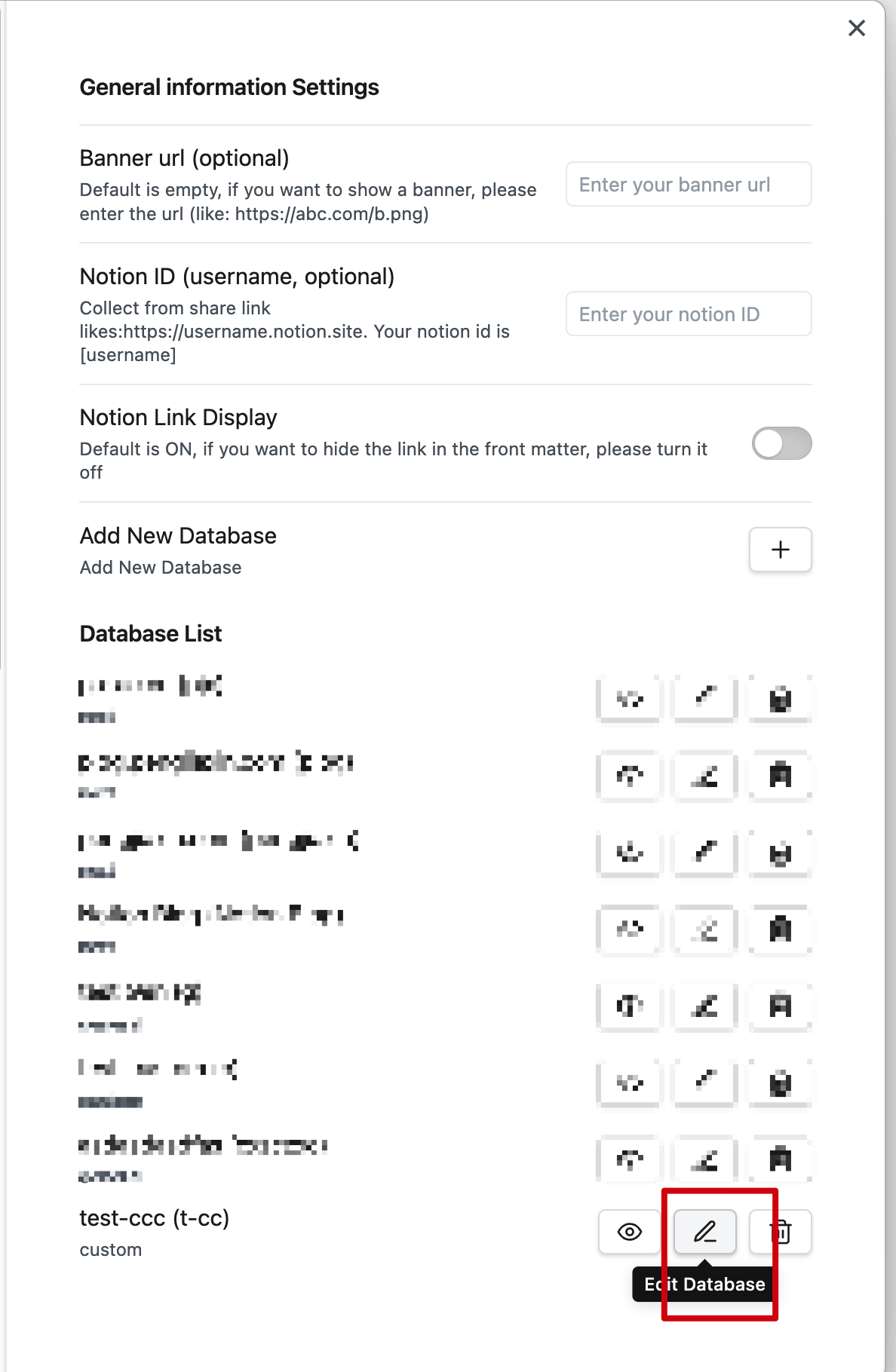
1). Click `Edit` in the plugin settings.
|
||||

|
||||
|
||||
2). Click `Add` and add the `summary` and `date` property.
|
||||
|
||||

|
||||
|
||||
|
||||
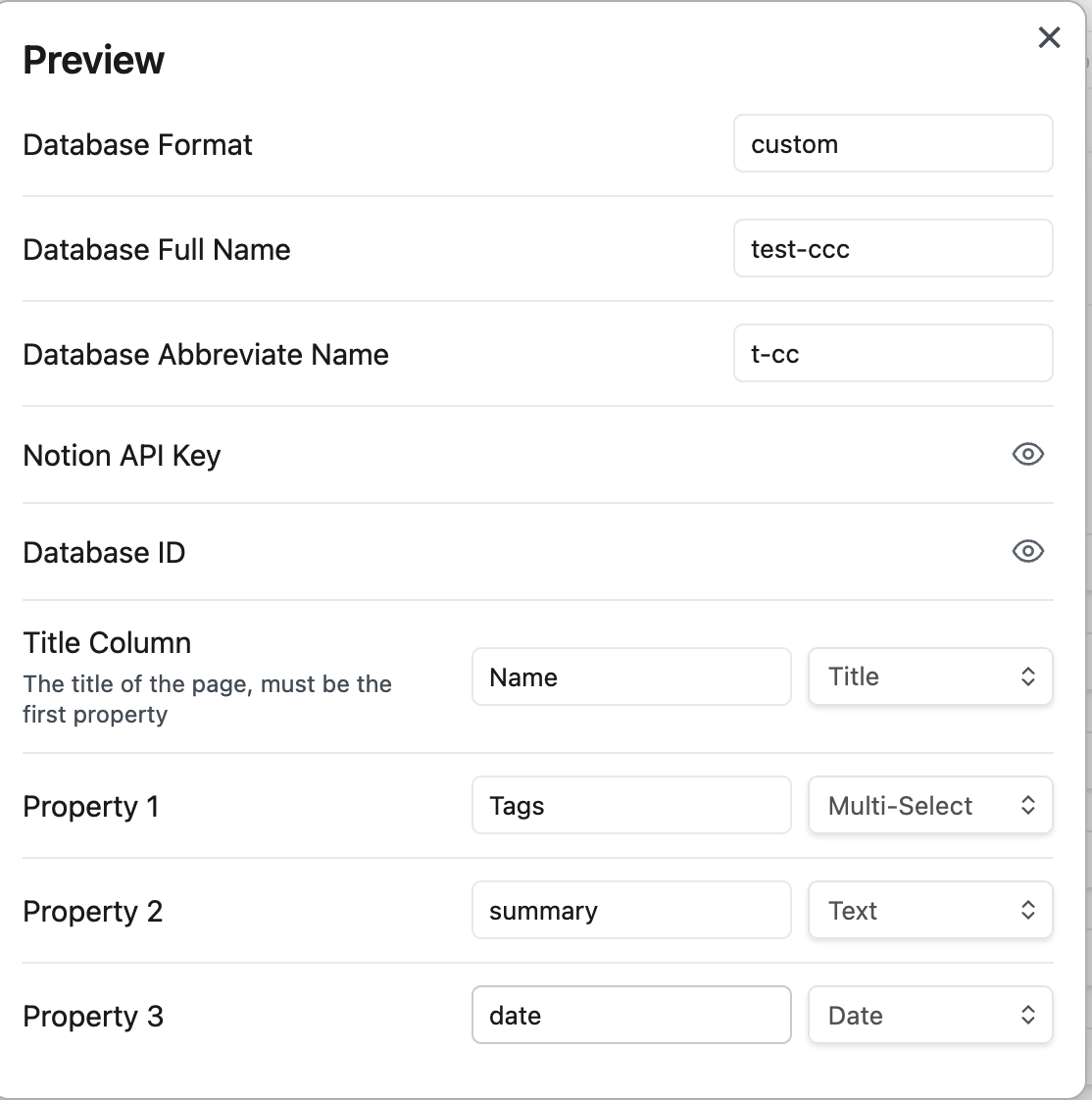
3). After adding the properties, you can see the properties in the plugin settings.
|
||||

|
||||
|
||||
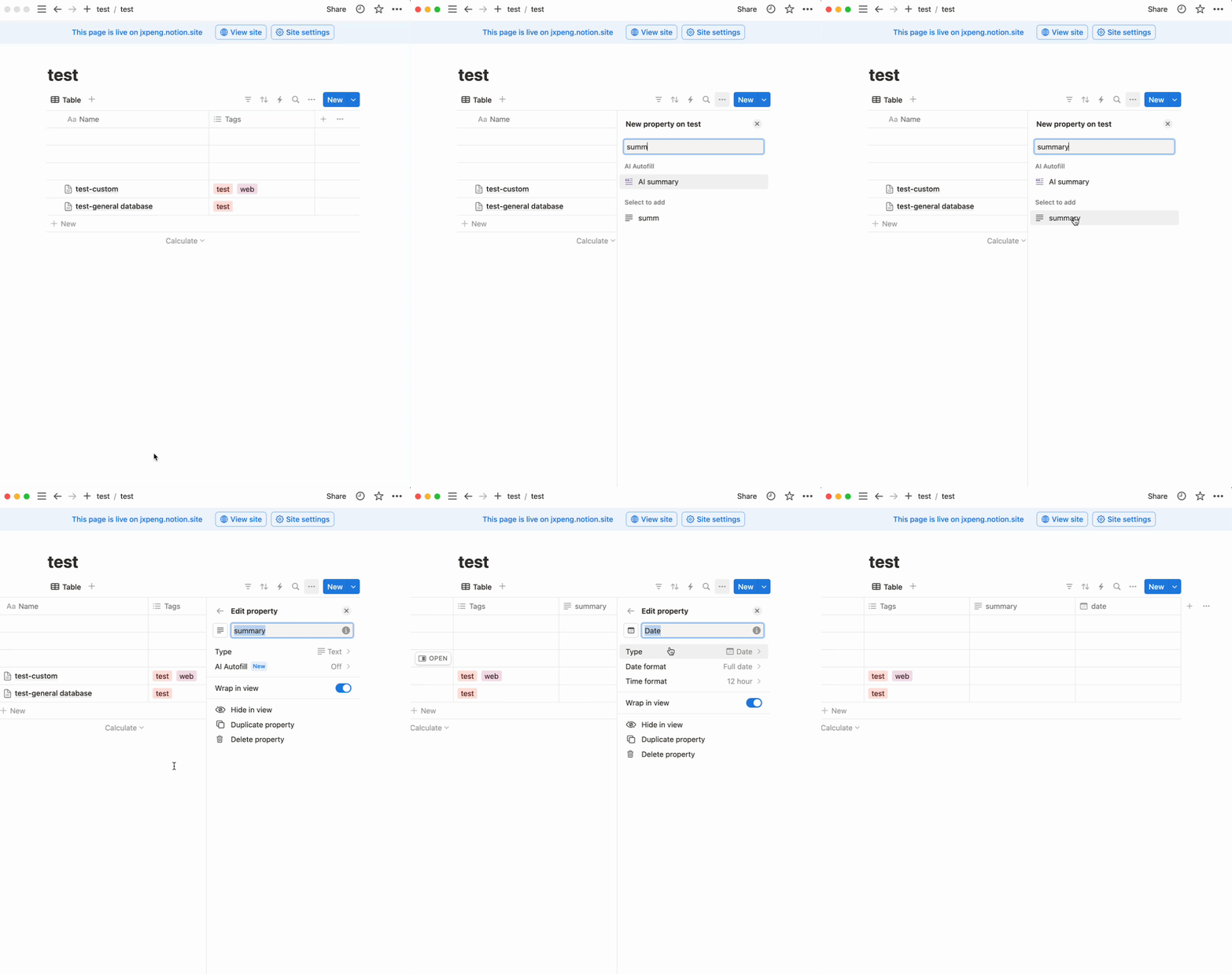
4). Add the `summary` and `date` in Notion
|
||||
|
||||

|
||||
|
||||
|
||||
5). Create a new note with the `summary` and `date` property.
|
||||
|
||||
@@ -246,7 +246,7 @@ Add more property to the custom database. For example, we can add a `summary` an
|
||||
|
||||
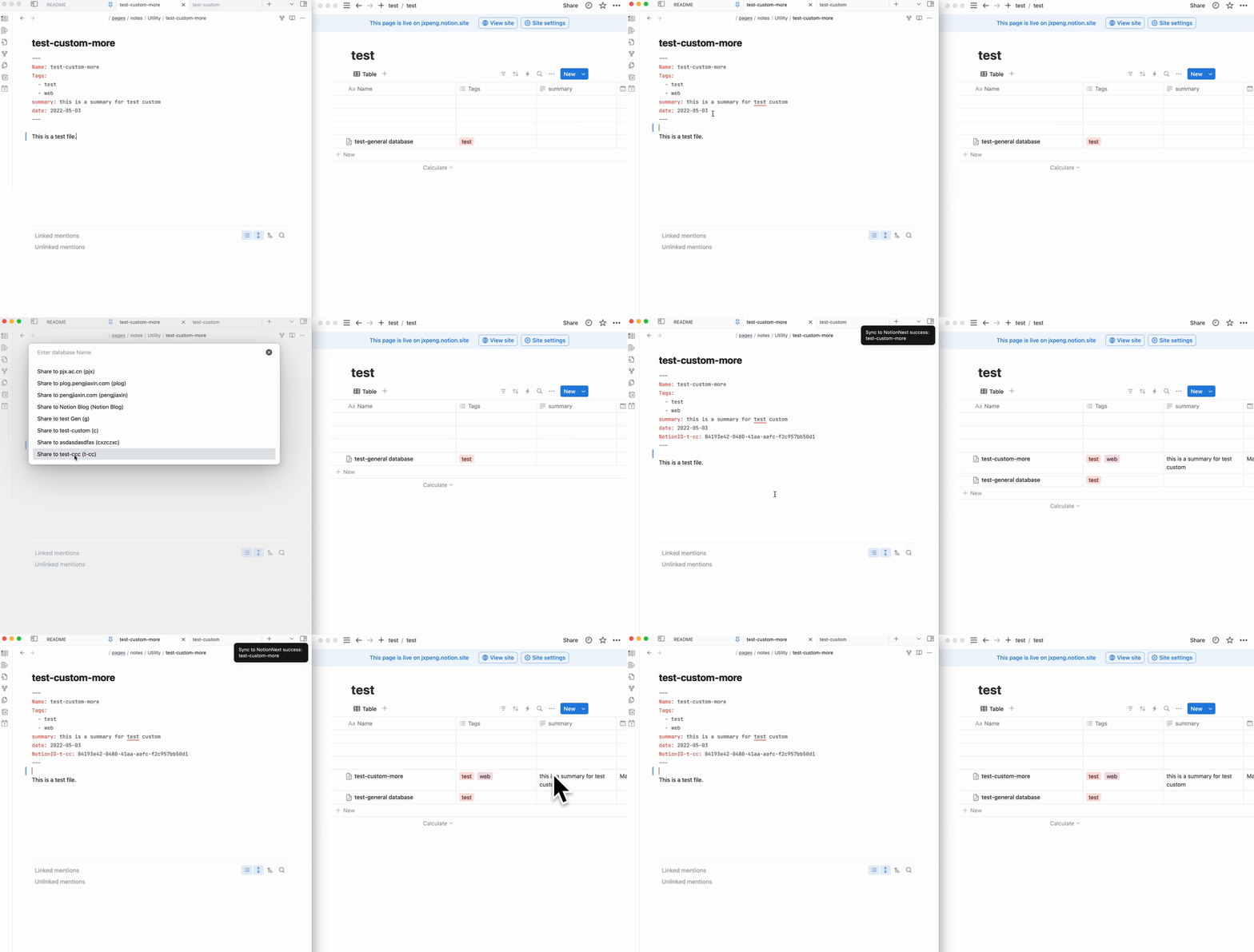
6). Sync the note to Notion.
|
||||
|
||||

|
||||
|
||||
|
||||
---
|
||||
|
||||
|
||||
@@ -41,7 +41,6 @@ const ctx = await esbuild.context({
|
||||
"@codemirror/view",
|
||||
...builtins,
|
||||
],
|
||||
platform: "node",
|
||||
format: "cjs",
|
||||
target: "es2016",
|
||||
logLevel: "info",
|
||||
|
||||
@@ -1,7 +1,7 @@
|
||||
{
|
||||
"id": "share-to-notionnext",
|
||||
"name": "Share to NotionNext",
|
||||
"version": "2.4.2",
|
||||
"version": "2.5.0",
|
||||
"minAppVersion": "0.0.1",
|
||||
"description": "Shares obsidian md file to notion with notion api for NotionNext web deploy, originally created by EasyChris/obsidian-to-notion.",
|
||||
"author": "EasyChris, jxpeng98",
|
||||
|
||||
@@ -1,6 +1,6 @@
|
||||
{
|
||||
"name": "share-to-notionnext",
|
||||
"version": "2.4.2",
|
||||
"version": "2.5.0",
|
||||
"type": "module",
|
||||
"description": "Share files to any Notion database using the Notion API, originally created by EasyChris/obsidian-to-notion.",
|
||||
"main": "main.js",
|
||||
@@ -26,7 +26,6 @@
|
||||
"dependencies": {
|
||||
"@jxpeng98/martian": "^1.2.7",
|
||||
"https-proxy-agent": "^7.0.2",
|
||||
"node-fetch": "^3.3.2",
|
||||
"remark-math": "^6.0.0",
|
||||
"yaml": "^2.3.4",
|
||||
"yaml-front-matter": "^4.1.1"
|
||||
|
||||
@@ -50,8 +50,10 @@ export async function uploadCommandNext(
|
||||
const {response} = res;
|
||||
if (response.status === 200) {
|
||||
new Notice(`${i18nConfig["sync-preffix"]} ${basename} ${i18nConfig["sync-success"]}`).noticeEl.style.color = "green";
|
||||
console.log(`${i18nConfig["sync-preffix"]} ${basename} ${i18nConfig["sync-success"]}`);
|
||||
} else {
|
||||
new Notice(`${i18nConfig["sync-fail"]} ${basename}`, 5000);
|
||||
console.log(`${i18nConfig["sync-fail"]} ${basename}`);
|
||||
}
|
||||
|
||||
}
|
||||
@@ -88,8 +90,10 @@ export async function uploadCommandGeneral(
|
||||
const {response} = res;
|
||||
if (response.status === 200) {
|
||||
new Notice(`${i18nConfig["sync-preffix"]} ${basename} ${i18nConfig["sync-success"]}`).noticeEl.style.color = "green";
|
||||
console.log(`${i18nConfig["sync-preffix"]} ${basename} ${i18nConfig["sync-success"]}`);
|
||||
} else {
|
||||
new Notice(`${i18nConfig["sync-fail"]} ${basename}`, 5000);
|
||||
console.log(`${i18nConfig["sync-fail"]} ${basename}`);
|
||||
}
|
||||
|
||||
}
|
||||
@@ -124,10 +128,13 @@ export async function uploadCommandCustom(
|
||||
const res = await upload.syncMarkdownToNotionCustom(cover, customValues, markDownData, nowFile, this.app);
|
||||
|
||||
const {response} = res;
|
||||
|
||||
if (response.status === 200) {
|
||||
new Notice(`${i18nConfig["sync-preffix"]} ${basename} ${i18nConfig["sync-success"]}`).noticeEl.style.color = "green";
|
||||
console.log(`${i18nConfig["sync-preffix"]} ${basename} ${i18nConfig["sync-success"]}`);
|
||||
} else {
|
||||
new Notice(`${i18nConfig["sync-fail"]} ${basename}`, 5000);
|
||||
console.log(`${i18nConfig["sync-fail"]} ${basename}`);
|
||||
}
|
||||
|
||||
}
|
||||
|
||||
@@ -1,11 +1,10 @@
|
||||
import {App, Notice, TFile, Platform, requestUrl} from "obsidian";
|
||||
import {App, Notice, TFile, requestUrl} from "obsidian";
|
||||
import {markdownToBlocks} from "@jxpeng98/martian";
|
||||
import * as yamlFrontMatter from "yaml-front-matter";
|
||||
import MyPlugin from "src/main";
|
||||
import {DatabaseDetails, PluginSettings} from "../../ui/settingTabs";
|
||||
import {UploadBaseGeneral} from "./BaseUpload2NotionGeneral";
|
||||
import {updateYamlInfo} from "../updateYaml";
|
||||
import fetch from 'node-fetch';
|
||||
import {i18nConfig} from "../../lang/I18n";
|
||||
|
||||
interface CreatePageResponse {
|
||||
@@ -142,81 +141,67 @@ export class Upload2NotionGeneral extends UploadBaseGeneral {
|
||||
}
|
||||
|
||||
console.log(bodyString)
|
||||
console.log(Platform.isDesktopApp)
|
||||
|
||||
let response: any;
|
||||
let data: any;
|
||||
|
||||
if (Platform.isMobileApp) {
|
||||
if(childArrLength > 100) {
|
||||
new Notice(i18nConfig["reach-mobile-limit"], 5000);
|
||||
} else {
|
||||
response = await requestUrl({
|
||||
url: `https://api.notion.com/v1/pages`,
|
||||
method: "POST",
|
||||
response = await requestUrl({
|
||||
url: `https://api.notion.com/v1/pages`,
|
||||
method: "POST",
|
||||
headers: {
|
||||
"Content-Type": "application/json",
|
||||
// 'User-Agent': 'obsidian.md',
|
||||
Authorization:
|
||||
"Bearer " + notionAPI,
|
||||
"Notion-Version": "2022-06-28",
|
||||
},
|
||||
body: JSON.stringify(bodyString),
|
||||
throw: false
|
||||
});
|
||||
|
||||
data = await response.json;
|
||||
|
||||
// console.log(data)
|
||||
// console.log(response.status)
|
||||
|
||||
if (response.status !== 200) {
|
||||
new Notice(`Error ${data.status}: ${data.code} \n ${i18nConfig["CheckConsole"]}`, 5000);
|
||||
console.log(`Error message: \n ${data.message}`);
|
||||
} else {
|
||||
console.log(`Page created: ${data.url}`);
|
||||
console.log(`Page ID: ${data.id}`);
|
||||
}
|
||||
//
|
||||
// upload the rest of the blocks
|
||||
if (pushCount > 0) {
|
||||
for (let i = 0; i < pushCount; i++) {
|
||||
const extraBlocks = {
|
||||
children: extraArr[i],
|
||||
};
|
||||
|
||||
console.log(extraBlocks)
|
||||
|
||||
const extraResponse = await requestUrl({
|
||||
url: `https://api.notion.com/v1/blocks/${data.id}/children`,
|
||||
method: "PATCH",
|
||||
headers: {
|
||||
"Content-Type": "application/json",
|
||||
// 'User-Agent': 'obsidian.md',
|
||||
Authorization:
|
||||
"Bearer " + notionAPI,
|
||||
"Authorization": "Bearer " + notionAPI,
|
||||
"Notion-Version": "2022-06-28",
|
||||
},
|
||||
body: JSON.stringify(bodyString),
|
||||
body: JSON.stringify(extraBlocks),
|
||||
});
|
||||
}
|
||||
}
|
||||
|
||||
if (Platform.isDesktopApp) {
|
||||
response = await fetch("https://api.notion.com/v1/pages", {
|
||||
method: "POST",
|
||||
headers: {
|
||||
"Content-Type": "application/json",
|
||||
"Authorization": "Bearer " + notionAPI,
|
||||
"Notion-Version": "2022-06-28",
|
||||
},
|
||||
body: JSON.stringify(bodyString),
|
||||
});
|
||||
const extraData: any = await extraResponse.json;
|
||||
|
||||
data = await response.json();
|
||||
|
||||
if (!response.ok) {
|
||||
new Notice(`Error ${data.status}: ${data.code} \n ${i18nConfig["CheckConsole"]}`, 5000);
|
||||
console.log(`Error message: \n ${data.message}`);
|
||||
} else {
|
||||
console.log(`Page created: ${data.url}`);
|
||||
console.log(`Page ID: ${data.id}`);
|
||||
}
|
||||
|
||||
// upload the rest of the blocks
|
||||
if (pushCount > 0) {
|
||||
for (let i = 0; i < pushCount; i++) {
|
||||
const extraBlocks = {
|
||||
children: extraArr[i],
|
||||
};
|
||||
|
||||
console.log(extraBlocks)
|
||||
|
||||
const extraResponse = await fetch(`https://api.notion.com/v1/blocks/${data.id}/children`, {
|
||||
method: "PATCH",
|
||||
headers: {
|
||||
"Content-Type": "application/json",
|
||||
"Authorization": "Bearer " + notionAPI,
|
||||
"Notion-Version": "2022-06-28",
|
||||
},
|
||||
body: JSON.stringify(extraBlocks),
|
||||
});
|
||||
|
||||
const extraData: any = await extraResponse.json();
|
||||
|
||||
if (!extraResponse.ok) {
|
||||
new Notice(`Error ${extraData.status}: ${extraData.code} \n ${i18nConfig["CheckConsole"]}`, 5000);
|
||||
console.log(`Error message: \n ${extraData.message}`);
|
||||
} else {
|
||||
console.log(`${i18nConfig["ExtraBlockUploaded"]} to page: ${data.id}`);
|
||||
if (i === pushCount - 1) {
|
||||
console.log(`${i18nConfig["BlockUploaded"]} to page: ${data.id}`);
|
||||
new Notice(`${i18nConfig["BlockUploaded"]} page: ${data.id}`, 5000);
|
||||
}
|
||||
if (extraResponse.status !== 200) {
|
||||
new Notice(`Error ${extraData.status}: ${extraData.code} \n ${i18nConfig["CheckConsole"]}`, 5000);
|
||||
console.log(`Error message: \n ${extraData.message}`);
|
||||
} else {
|
||||
console.log(`${i18nConfig["ExtraBlockUploaded"]} to page: ${data.id}`);
|
||||
if (i === pushCount - 1) {
|
||||
console.log(`${i18nConfig["BlockUploaded"]} to page: ${data.id}`);
|
||||
new Notice(`${i18nConfig["BlockUploaded"]} page: ${data.id}`, 5000);
|
||||
}
|
||||
}
|
||||
}
|
||||
@@ -266,30 +251,17 @@ export class Upload2NotionGeneral extends UploadBaseGeneral {
|
||||
|
||||
let {response, data} = res;
|
||||
|
||||
if (Platform.isDesktopApp) {
|
||||
if (response && response.status === 200) {
|
||||
await updateYamlInfo(
|
||||
markdown,
|
||||
nowFile,
|
||||
data,
|
||||
app,
|
||||
this.plugin,
|
||||
this.dbDetails
|
||||
);
|
||||
}
|
||||
}
|
||||
// console.log(response)
|
||||
|
||||
if (Platform.isMobileApp) {
|
||||
if (response && response.status === 200) {
|
||||
await updateYamlInfo(
|
||||
markdown,
|
||||
nowFile,
|
||||
response,
|
||||
app,
|
||||
this.plugin,
|
||||
this.dbDetails,
|
||||
);
|
||||
}
|
||||
if (response && response.status === 200) {
|
||||
await updateYamlInfo(
|
||||
markdown,
|
||||
nowFile,
|
||||
data,
|
||||
app,
|
||||
this.plugin,
|
||||
this.dbDetails,
|
||||
);
|
||||
}
|
||||
|
||||
return res;
|
||||
|
||||
@@ -1,12 +1,11 @@
|
||||
import {UploadBaseNext} from "./BaseUpload2NotionNext";
|
||||
import {App, Notice, TFile, Platform, requestUrl} from "obsidian";
|
||||
import {App, Notice, TFile, requestUrl} from "obsidian";
|
||||
import {markdownToBlocks} from "@jxpeng98/martian";
|
||||
import * as yamlFrontMatter from "yaml-front-matter";
|
||||
import MyPlugin from "src/main";
|
||||
import {DatabaseDetails, PluginSettings} from "../../ui/settingTabs";
|
||||
import {updateYamlInfo} from "../updateYaml";
|
||||
import {LIMITS, paragraph} from "@jxpeng98/martian/src/notion";
|
||||
import fetch from 'node-fetch';
|
||||
import {i18nConfig} from "../../lang/I18n";
|
||||
|
||||
interface CreatePageResponse {
|
||||
@@ -247,76 +246,63 @@ export class Upload2NotionNext extends UploadBaseNext {
|
||||
let response: any;
|
||||
let data: any;
|
||||
|
||||
if (Platform.isMobileApp) {
|
||||
if(childArrLength > 100) {
|
||||
new Notice(i18nConfig["reach-mobile-limit"], 5000);
|
||||
} else {
|
||||
response = await requestUrl({
|
||||
url: `https://api.notion.com/v1/pages`,
|
||||
method: "POST",
|
||||
response = await requestUrl({
|
||||
url: `https://api.notion.com/v1/pages`,
|
||||
method: "POST",
|
||||
headers: {
|
||||
"Content-Type": "application/json",
|
||||
// 'User-Agent': 'obsidian.md',
|
||||
Authorization:
|
||||
"Bearer " + notionAPI,
|
||||
"Notion-Version": "2022-06-28",
|
||||
},
|
||||
body: JSON.stringify(bodyString),
|
||||
throw: false
|
||||
});
|
||||
|
||||
data = await response.json;
|
||||
|
||||
// console.log(data)
|
||||
// console.log(response.status)
|
||||
|
||||
if (response.status !== 200) {
|
||||
new Notice(`Error ${data.status}: ${data.code} \n ${i18nConfig["CheckConsole"]}`, 5000);
|
||||
console.log(`Error message: \n ${data.message}`);
|
||||
} else {
|
||||
console.log(`Page created: ${data.url}`);
|
||||
console.log(`Page ID: ${data.id}`);
|
||||
}
|
||||
//
|
||||
// upload the rest of the blocks
|
||||
if (pushCount > 0) {
|
||||
for (let i = 0; i < pushCount; i++) {
|
||||
const extraBlocks = {
|
||||
children: extraArr[i],
|
||||
};
|
||||
|
||||
console.log(extraBlocks)
|
||||
|
||||
const extraResponse = await requestUrl({
|
||||
url: `https://api.notion.com/v1/blocks/${data.id}/children`,
|
||||
method: "PATCH",
|
||||
headers: {
|
||||
"Content-Type": "application/json",
|
||||
// 'User-Agent': 'obsidian.md',
|
||||
Authorization:
|
||||
"Bearer " + notionAPI,
|
||||
"Authorization": "Bearer " + notionAPI,
|
||||
"Notion-Version": "2022-06-28",
|
||||
},
|
||||
body: JSON.stringify(bodyString),
|
||||
body: JSON.stringify(extraBlocks),
|
||||
});
|
||||
}
|
||||
}
|
||||
|
||||
if (Platform.isDesktopApp) {
|
||||
response = await fetch("https://api.notion.com/v1/pages", {
|
||||
method: "POST",
|
||||
headers: {
|
||||
"Content-Type": "application/json",
|
||||
"Authorization": "Bearer " + notionAPI,
|
||||
"Notion-Version": "2022-06-28",
|
||||
},
|
||||
body: JSON.stringify(bodyString),
|
||||
});
|
||||
const extraData: any = await extraResponse.json;
|
||||
|
||||
data = await response.json();
|
||||
|
||||
if (!response.ok) {
|
||||
new Notice(`Error ${data.status}: ${data.code} \n ${i18nConfig["CheckConsole"]}`, 5000);
|
||||
console.log(`Error message: \n ${data.message}`);
|
||||
} else {
|
||||
console.log(`Page created: ${data.url}`);
|
||||
console.log(`Page ID: ${data.id}`);
|
||||
}
|
||||
|
||||
// upload the rest of the blocks
|
||||
if (pushCount > 0) {
|
||||
for (let i = 0; i < pushCount; i++) {
|
||||
const extraBlocks = {
|
||||
children: extraArr[i],
|
||||
};
|
||||
|
||||
console.log(extraBlocks)
|
||||
|
||||
const extraResponse = await fetch(`https://api.notion.com/v1/blocks/${data.id}/children`, {
|
||||
method: "PATCH",
|
||||
headers: {
|
||||
"Content-Type": "application/json",
|
||||
"Authorization": "Bearer " + notionAPI,
|
||||
"Notion-Version": "2022-06-28",
|
||||
},
|
||||
body: JSON.stringify(extraBlocks),
|
||||
});
|
||||
|
||||
const extraData: any = await extraResponse.json();
|
||||
|
||||
if (!extraResponse.ok) {
|
||||
new Notice(`Error ${extraData.status}: ${extraData.code} \n ${i18nConfig["CheckConsole"]}`, 5000);
|
||||
console.log(`Error message: \n ${extraData.message}`);
|
||||
} else {
|
||||
console.log(`${i18nConfig["ExtraBlockUploaded"]} to page: ${data.id}`);
|
||||
if (i === pushCount - 1) {
|
||||
console.log(`${i18nConfig["BlockUploaded"]} to page: ${data.id}`);
|
||||
new Notice(`${i18nConfig["BlockUploaded"]} page: ${data.id}`, 5000);
|
||||
}
|
||||
if (extraResponse.status !== 200) {
|
||||
new Notice(`Error ${extraData.status}: ${extraData.code} \n ${i18nConfig["CheckConsole"]}`, 5000);
|
||||
console.log(`Error message: \n ${extraData.message}`);
|
||||
} else {
|
||||
console.log(`${i18nConfig["ExtraBlockUploaded"]} to page: ${data.id}`);
|
||||
if (i === pushCount - 1) {
|
||||
console.log(`${i18nConfig["BlockUploaded"]} to page: ${data.id}`);
|
||||
new Notice(`${i18nConfig["BlockUploaded"]} page: ${data.id}`, 5000);
|
||||
}
|
||||
}
|
||||
}
|
||||
@@ -416,30 +402,17 @@ export class Upload2NotionNext extends UploadBaseNext {
|
||||
|
||||
let {response, data} = res;
|
||||
|
||||
if (Platform.isDesktopApp) {
|
||||
if (response && response.status === 200) {
|
||||
await updateYamlInfo(
|
||||
markdown,
|
||||
nowFile,
|
||||
data,
|
||||
app,
|
||||
this.plugin,
|
||||
this.dbDetails
|
||||
);
|
||||
}
|
||||
}
|
||||
// console.log(response)
|
||||
|
||||
if (Platform.isMobileApp) {
|
||||
if (response && response.status === 200) {
|
||||
await updateYamlInfo(
|
||||
markdown,
|
||||
nowFile,
|
||||
response,
|
||||
app,
|
||||
this.plugin,
|
||||
this.dbDetails,
|
||||
);
|
||||
}
|
||||
if (response && response.status === 200) {
|
||||
await updateYamlInfo(
|
||||
markdown,
|
||||
nowFile,
|
||||
data,
|
||||
app,
|
||||
this.plugin,
|
||||
this.dbDetails,
|
||||
);
|
||||
}
|
||||
|
||||
return res;
|
||||
|
||||
@@ -1,11 +1,10 @@
|
||||
import {App, Notice, Platform, TFile, requestUrl} from "obsidian";
|
||||
import {App, Notice, TFile, requestUrl} from "obsidian";
|
||||
import {markdownToBlocks} from "@jxpeng98/martian";
|
||||
import * as yamlFrontMatter from "yaml-front-matter";
|
||||
import MyPlugin from "src/main";
|
||||
import {DatabaseDetails, PluginSettings} from "../../ui/settingTabs";
|
||||
import {updateYamlInfo} from "../updateYaml";
|
||||
import {UploadBaseCustom} from "./BaseUpload2NotionCustom";
|
||||
import fetch from 'node-fetch';
|
||||
import {i18nConfig} from "../../lang/I18n";
|
||||
|
||||
|
||||
@@ -60,15 +59,15 @@ export class Upload2NotionCustom extends UploadBaseCustom {
|
||||
|
||||
// remove the annotations from the childArr if type is code block
|
||||
childArr.forEach((block: any) => {
|
||||
if (block.type === "code") {
|
||||
block.code.rich_text.forEach((item: any) => {
|
||||
if (item.type === "text" && item.annotations) {
|
||||
delete item.annotations;
|
||||
if (block.type === "code") {
|
||||
block.code.rich_text.forEach((item: any) => {
|
||||
if (item.type === "text" && item.annotations) {
|
||||
delete item.annotations;
|
||||
}
|
||||
}
|
||||
}
|
||||
);
|
||||
);
|
||||
}
|
||||
}
|
||||
}
|
||||
);
|
||||
|
||||
// check the length of the childArr and split it into chunks of 100
|
||||
@@ -114,81 +113,67 @@ export class Upload2NotionCustom extends UploadBaseCustom {
|
||||
}
|
||||
|
||||
console.log(bodyString)
|
||||
console.log(Platform.isDesktopApp)
|
||||
|
||||
let response: any;
|
||||
let data: any;
|
||||
|
||||
if (Platform.isMobileApp) {
|
||||
if(childArrLength > 100) {
|
||||
new Notice(i18nConfig["reach-mobile-limit"], 5000);
|
||||
} else {
|
||||
response = await requestUrl({
|
||||
url: `https://api.notion.com/v1/pages`,
|
||||
method: "POST",
|
||||
response = await requestUrl({
|
||||
url: `https://api.notion.com/v1/pages`,
|
||||
method: "POST",
|
||||
headers: {
|
||||
"Content-Type": "application/json",
|
||||
// 'User-Agent': 'obsidian.md',
|
||||
Authorization:
|
||||
"Bearer " + notionAPI,
|
||||
"Notion-Version": "2022-06-28",
|
||||
},
|
||||
body: JSON.stringify(bodyString),
|
||||
throw: false
|
||||
});
|
||||
|
||||
data = await response.json;
|
||||
|
||||
// console.log(data)
|
||||
// console.log(response.status)
|
||||
|
||||
if (response.status !== 200) {
|
||||
new Notice(`Error ${data.status}: ${data.code} \n ${i18nConfig["CheckConsole"]}`, 5000);
|
||||
console.log(`Error message: \n ${data.message}`);
|
||||
} else {
|
||||
console.log(`Page created: ${data.url}`);
|
||||
console.log(`Page ID: ${data.id}`);
|
||||
}
|
||||
//
|
||||
// upload the rest of the blocks
|
||||
if (pushCount > 0) {
|
||||
for (let i = 0; i < pushCount; i++) {
|
||||
const extraBlocks = {
|
||||
children: extraArr[i],
|
||||
};
|
||||
|
||||
console.log(extraBlocks)
|
||||
|
||||
const extraResponse = await requestUrl({
|
||||
url: `https://api.notion.com/v1/blocks/${data.id}/children`,
|
||||
method: "PATCH",
|
||||
headers: {
|
||||
"Content-Type": "application/json",
|
||||
// 'User-Agent': 'obsidian.md',
|
||||
Authorization:
|
||||
"Bearer " + notionAPI,
|
||||
"Authorization": "Bearer " + notionAPI,
|
||||
"Notion-Version": "2022-06-28",
|
||||
},
|
||||
body: JSON.stringify(bodyString),
|
||||
body: JSON.stringify(extraBlocks),
|
||||
});
|
||||
}
|
||||
}
|
||||
|
||||
if (Platform.isDesktopApp) {
|
||||
response = await fetch("https://api.notion.com/v1/pages", {
|
||||
method: "POST",
|
||||
headers: {
|
||||
"Content-Type": "application/json",
|
||||
"Authorization": "Bearer " + notionAPI,
|
||||
"Notion-Version": "2022-06-28",
|
||||
},
|
||||
body: JSON.stringify(bodyString),
|
||||
});
|
||||
const extraData: any = await extraResponse.json;
|
||||
|
||||
data = await response.json();
|
||||
|
||||
if (!response.ok) {
|
||||
new Notice(`Error ${data.status}: ${data.code} \n ${i18nConfig["CheckConsole"]}`, 5000);
|
||||
console.log(`Error message: \n ${data.message}`);
|
||||
} else {
|
||||
console.log(`Page created: ${data.url}`);
|
||||
console.log(`Page ID: ${data.id}`);
|
||||
}
|
||||
|
||||
// upload the rest of the blocks
|
||||
if (pushCount > 0) {
|
||||
for (let i = 0; i < pushCount; i++) {
|
||||
const extraBlocks = {
|
||||
children: extraArr[i],
|
||||
};
|
||||
|
||||
console.log(extraBlocks)
|
||||
|
||||
const extraResponse = await fetch(`https://api.notion.com/v1/blocks/${data.id}/children`, {
|
||||
method: "PATCH",
|
||||
headers: {
|
||||
"Content-Type": "application/json",
|
||||
"Authorization": "Bearer " + notionAPI,
|
||||
"Notion-Version": "2022-06-28",
|
||||
},
|
||||
body: JSON.stringify(extraBlocks),
|
||||
});
|
||||
|
||||
const extraData: any = await extraResponse.json();
|
||||
|
||||
if (!extraResponse.ok) {
|
||||
new Notice(`Error ${extraData.status}: ${extraData.code} \n ${i18nConfig["CheckConsole"]}`, 5000);
|
||||
console.log(`Error message: \n ${extraData.message}`);
|
||||
} else {
|
||||
console.log(`${i18nConfig["ExtraBlockUploaded"]} to page: ${data.id}`);
|
||||
if (i === pushCount - 1) {
|
||||
console.log(`${i18nConfig["BlockUploaded"]} to page: ${data.id}`);
|
||||
new Notice(`${i18nConfig["BlockUploaded"]} page: ${data.id}`, 5000);
|
||||
}
|
||||
if (extraResponse.status !== 200) {
|
||||
new Notice(`Error ${extraData.status}: ${extraData.code} \n ${i18nConfig["CheckConsole"]}`, 5000);
|
||||
console.log(`Error message: \n ${extraData.message}`);
|
||||
} else {
|
||||
console.log(`${i18nConfig["ExtraBlockUploaded"]} to page: ${data.id}`);
|
||||
if (i === pushCount - 1) {
|
||||
console.log(`${i18nConfig["BlockUploaded"]} to page: ${data.id}`);
|
||||
new Notice(`${i18nConfig["BlockUploaded"]} page: ${data.id}`, 5000);
|
||||
}
|
||||
}
|
||||
}
|
||||
@@ -238,30 +223,15 @@ export class Upload2NotionCustom extends UploadBaseCustom {
|
||||
|
||||
// console.log(response)
|
||||
|
||||
if (Platform.isDesktopApp) {
|
||||
if (response && response.status === 200) {
|
||||
await updateYamlInfo(
|
||||
markdown,
|
||||
nowFile,
|
||||
data,
|
||||
app,
|
||||
this.plugin,
|
||||
this.dbDetails
|
||||
);
|
||||
}
|
||||
}
|
||||
|
||||
if (Platform.isMobileApp) {
|
||||
if (response && response.status === 200) {
|
||||
await updateYamlInfo(
|
||||
markdown,
|
||||
nowFile,
|
||||
response,
|
||||
app,
|
||||
this.plugin,
|
||||
this.dbDetails,
|
||||
);
|
||||
}
|
||||
if (response && response.status === 200) {
|
||||
await updateYamlInfo(
|
||||
markdown,
|
||||
nowFile,
|
||||
data,
|
||||
app,
|
||||
this.plugin,
|
||||
this.dbDetails,
|
||||
);
|
||||
}
|
||||
|
||||
return res;
|
||||
|
||||
@@ -35,7 +35,10 @@ export async function getNowFileMarkdownContentCustom(
|
||||
|
||||
// If a 'title' type property exists, use the file's basename as its value
|
||||
if (titleProperty) {
|
||||
customValues[titleProperty.customName] = nowFile.basename; // Use 'basename' for the file name without extension
|
||||
customValues[titleProperty.customName] =
|
||||
(FileCache.frontmatter && FileCache.frontmatter[titleProperty.customName]) ?
|
||||
FileCache.frontmatter[titleProperty.customName] : // use the front matter value if it exists
|
||||
nowFile.basename; // Use 'basename' for the file name without extension
|
||||
}
|
||||
|
||||
} catch (error) {
|
||||
|
||||
@@ -460,6 +460,13 @@ commander@^8.3.0:
|
||||
resolved "https://registry.yarnpkg.com/commander/-/commander-8.3.0.tgz#4837ea1b2da67b9c616a67afbb0fafee567bca66"
|
||||
integrity sha512-OkTL9umf+He2DZkUq8f8J9of7yL6RJKI24dVITBmNfZBmri9zYZQrKkuXiKhyfPSu8tUhnVBB1iKXevvnlR4Ww==
|
||||
|
||||
cross-fetch@^4.0.0:
|
||||
version "4.0.0"
|
||||
resolved "https://registry.yarnpkg.com/cross-fetch/-/cross-fetch-4.0.0.tgz#f037aef1580bb3a1a35164ea2a848ba81b445983"
|
||||
integrity sha512-e4a5N8lVvuLgAWgnCrLr2PP0YyDOTHa9H/Rj54dirp61qXnNq46m82bRhNqIA5VccJtWBvPTFRV3TtvHUKPB1g==
|
||||
dependencies:
|
||||
node-fetch "^2.6.12"
|
||||
|
||||
data-uri-to-buffer@^4.0.0:
|
||||
version "4.0.1"
|
||||
resolved "https://registry.yarnpkg.com/data-uri-to-buffer/-/data-uri-to-buffer-4.0.1.tgz#d8feb2b2881e6a4f58c2e08acfd0e2834e26222e"
|
||||
@@ -1199,7 +1206,7 @@ node-domexception@^1.0.0:
|
||||
resolved "https://registry.yarnpkg.com/node-domexception/-/node-domexception-1.0.0.tgz#6888db46a1f71c0b76b3f7555016b63fe64766e5"
|
||||
integrity sha512-/jKZoMpw0F8GRwl4/eLROPA3cfcXtLApP0QzLmUT/HuPCZWyB7IY9ZrMeKw2O/nFIqPQB3PVM9aYm0F312AXDQ==
|
||||
|
||||
node-fetch@^2.6.1:
|
||||
node-fetch@^2.6.1, node-fetch@^2.6.12:
|
||||
version "2.7.0"
|
||||
resolved "https://registry.yarnpkg.com/node-fetch/-/node-fetch-2.7.0.tgz#d0f0fa6e3e2dc1d27efcd8ad99d550bda94d187d"
|
||||
integrity sha512-c4FRfUm/dbcWZ7U+1Wq0AwCyFL+3nt2bEw05wfxSz+DWpWsitgmSgYmy2dQdWyKC1694ELPqMs/YzUSNozLt8A==
|
||||
|
||||
Reference in New Issue
Block a user