mirror of
https://github.com/jxpeng98/obsidian-to-NotionNext
synced 2026-07-29 08:08:34 +08:00

70 lines
2.3 KiB
Markdown
70 lines
2.3 KiB
Markdown
Obsidian share to Notion
|
|
|
|
Share obsidian files to Notion with one click, and auto add Notion share link in obsidian
|
|
|
|

|
|
|
|
# How to use
|
|
## Install the plugin
|
|
### BRAT
|
|
Search for `BRAT` plugin in the plugin market center
|
|
Add `EasyChris/obsidian-to-notion` to the list of installed BRAT plugins
|
|
Go back to the plugin center and enable it
|
|
### Manual installation
|
|
```
|
|
cd YOUR_OBSIDIAN_FOLDER/.obsidian/plugins/
|
|
git clone https://github.com/EasyChris/obsidian-to-notion.git
|
|
```
|
|
### Marketplace download
|
|
Please install via BRAT because it's not on the market yet
|
|
|
|
## Apply Notion API
|
|
Official reference documentation: [https://developers.notion.com/docs](https://developers.notion.com/docs)
|
|
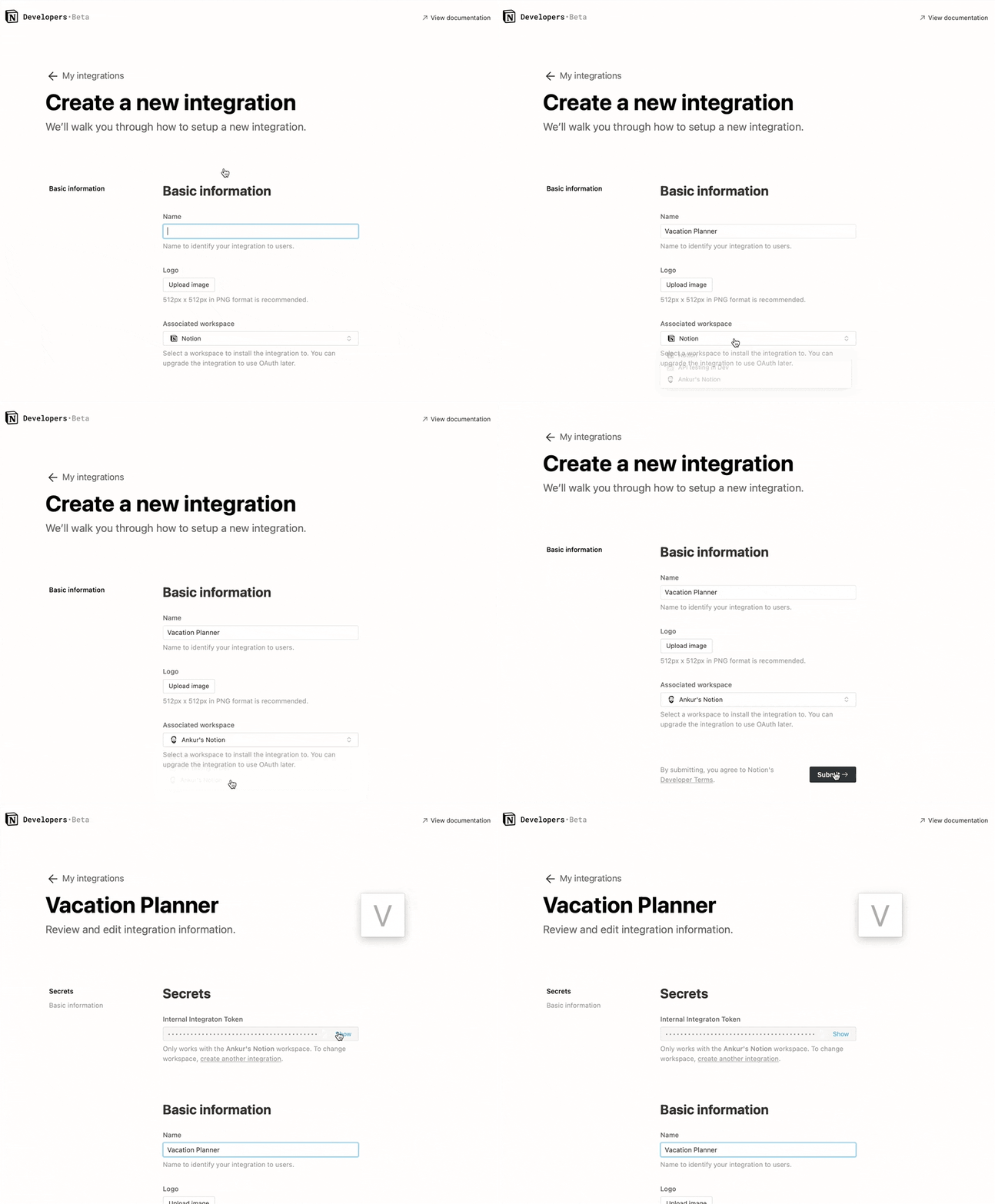
### Step 1: Create integration.
|
|
Go to [https://www.notion.com/my-integrations](https://www.notion.com/my-integrations)
|
|
Once created, copy `secrets toekn`
|
|
|
|
|
|
### Step 2: Share a database with your integration
|
|
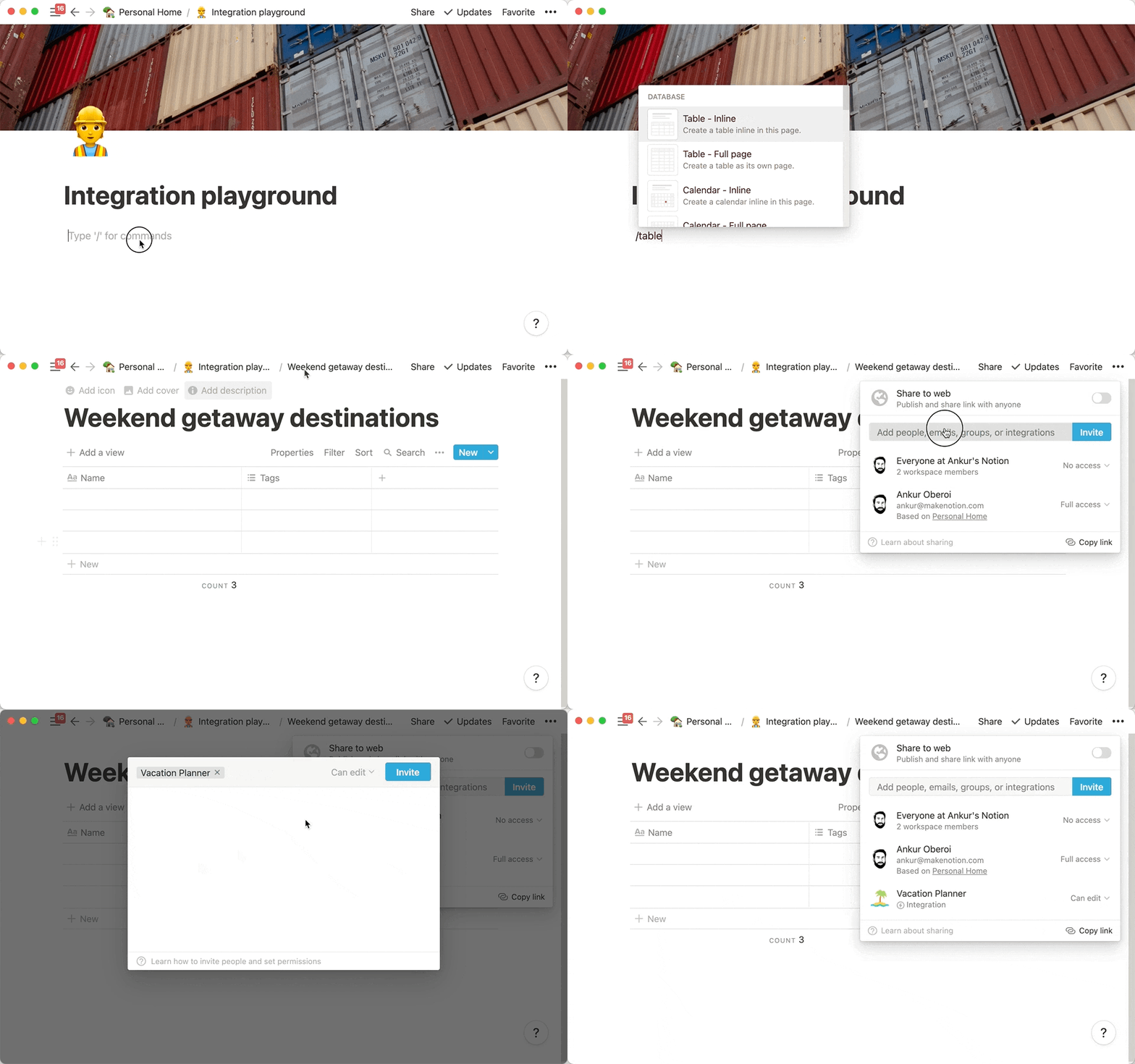
Create a new page (with public permissions)
|
|
Create a new database in the page -> you need `full page database`
|
|

|
|
|
|
Add `integration` to your new database
|
|
|
|
|
|
|
|
### Step 3: Copy the database ID
|
|
|
|
```
|
|
https://www.notion.so/myworkspace/a8aec43384f447ed84390e8e42c2e089?v=...
|
|
| --------- Database ID --------|
|
|
|
|
```
|
|
|
|
|
|
|
|
## Open the plugin configuration
|
|
Fill the configuration with the `NOTION_API_KEY` and `DATABASE_ID` you got
|
|

|
|
|
|
## Upload file content to notion
|
|
Click the upload notion button
|
|

|
|
A share link will be automatically generated after successful upload
|
|

|
|
|
|
|
|
# Buy me a cup of coffee.
|
|
|
|
[Buy me a coffee](https://dun.mianbaoduo.com/@easy)
|
|
|
|
# Thanks
|
|
[Development Process | Obsidian Plugin Development Documentation](https://luhaifeng666.github.io/obsidian-plugin-docs-zh/zh/getting-started/development-workflow.html)
|
|
|
|
[GitHub - devbean/obsidian-wordpress: An obsidian plugin for publishing docs to WordPress.](https://github.com/devbean/obsidian-wordpress)
|
|
|
|
[GitHub - obsidianmd/obsidian-api](https://github.com/obsidianmd/obsidian-api)
|
|
|
|
[GitHub - zhaohongxuan/obsidian-weread-plugin: Obsidian Weread Plugin is an plugin to sync Weread(微信读书) hightlights and annotations into your Obsidian Vault.](https://github.com/zhaohongxuan/obsidian-weread-plugin)
|