mirror of
https://github.com/jxpeng98/obsidian-to-NotionNext
synced 2026-07-29 08:08:34 +08:00

105 lines
4.3 KiB
Markdown
105 lines
4.3 KiB
Markdown
# Obsidian to Notion
|
||
[](https://github.com/Easychris/obsidian-to-notion/actions/workflows/CI.yml)
|
||
[](https://github.com/Easychris/obsidian-to-notion/actions/workflows/release.yml)
|
||
[](https://raw.githubusercontent.com/EasyChris/obsidian-to-notion/master/LICENSE)
|
||
[](https://GitHub.com/Easychris/obsidian-to-notion/releases/)
|
||
[](https://github.com/Easychris/obsidian-to-notion/releases)
|
||
|
||
Obsidian share to Notion [English](README.md)
|
||
|
||
将obsidian文件一键分享到Notion,并在obsidian中添加Notion分享链接
|
||
|
||
如果能对你有所帮助,欢迎给一个star支持。
|
||
|
||

|
||
|
||
# 使用方式
|
||
## 安装插件
|
||
|
||
### 市场下载
|
||
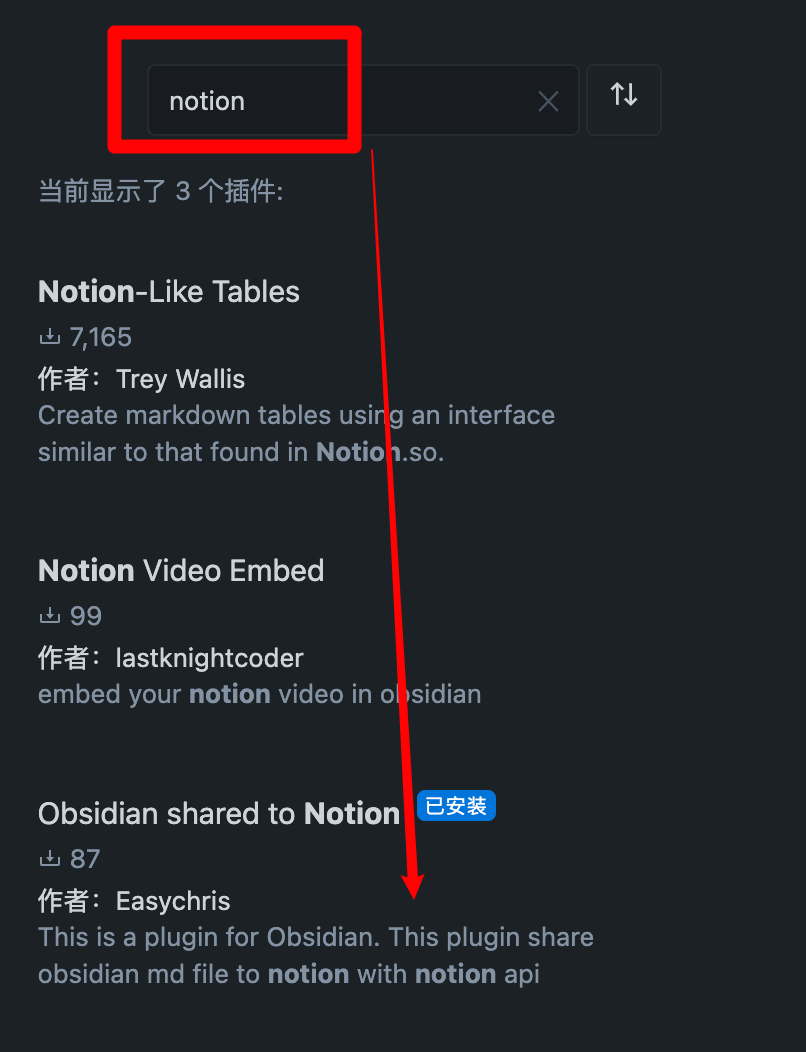
插件市场搜索 noiton 即可下载
|
||
|
||
|
||
### BRAT
|
||
插件中中心搜索 BRAT
|
||
添加 `EasyChris/obsidian-to-notion` 到 BRAT 插件安装列表中
|
||
返回插件中心启用即可
|
||
### 手动安装
|
||
```
|
||
cd YOUR_OBSIDIAN_FOLDER/.obsidian/plugins/
|
||
git clone https://github.com/EasyChris/obsidian-to-notion.git
|
||
```
|
||
|
||
|
||
## 申请 Notion API
|
||
官方参考文档:[https://developers.notion.com/docs](https://developers.notion.com/docs)
|
||
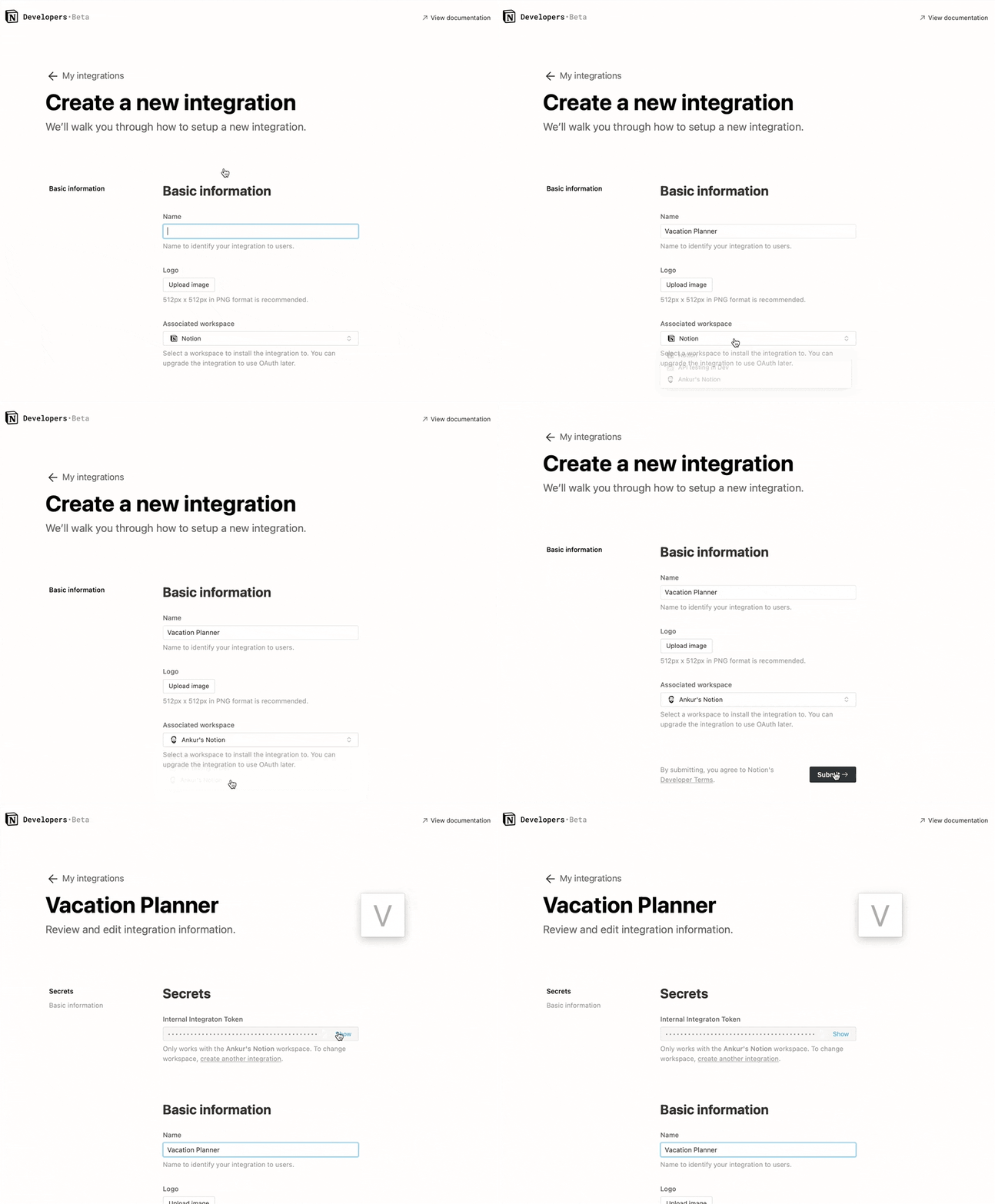
### 第 1 步:创建integration。
|
||
转到 [https://www.notion.com/my-integrations](https://www.notion.com/my-integrations)
|
||
创建完成之后,复制`secrets toekn`
|
||
|
||
|
||
### 第2步:与你的集成共享一个数据库
|
||
新建一个的page(权限为公开)
|
||
在page中新建一个数据库 -> 需要`full page database`
|
||

|
||
|
||
将`integration`添加到你的新建的数据库中
|
||
|
||

|
||
|
||
#### 注意
|
||
|
||
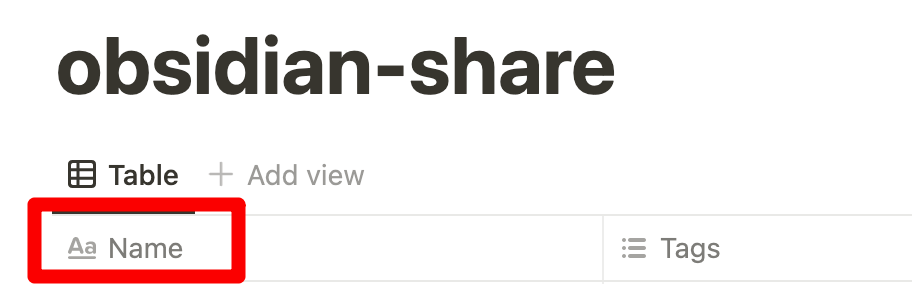
数据库的第一个自定义名称必须是 "Name",否则同步会失败。
|
||
|
||
|
||
|
||
|
||
|
||
|
||
### 第三步:复制database ID
|
||
|
||
```
|
||
https://www.notion.so/myworkspace/a8aec43384f447ed84390e8e42c2e089?v=...
|
||
|--------- Database ID --------|
|
||
|
||
```
|
||
|
||
|
||
|
||
## 打开插件配置
|
||
将得到的 `NOTION_API_KEY` 和 `DATABASE_ID`填入配置当中
|
||

|
||
|
||
## 上传文件内容到notion
|
||
点击上传notion的按钮
|
||

|
||
上传成功之后会自动生成一个分享链接
|
||

|
||
|
||
|
||
## 页面 Banner 链接[可选]
|
||
默认可以不填写
|
||
横幅URL必须是图像URL,例如:https://i.imgur.com/xxx.jpg
|
||
|
||
## Notion ID [可选]
|
||
Notion ID是你想分享文件的页面ID。
|
||
如果你不写它,notion将分享到默认的链接,如:https://www.notion.so/myworkspace/a8aec43384f447ed84390,访问这个页面将重定向到你的网站页面。
|
||
如果你写了Notion ID,它将分享到页面链接如:https://your_user_name.notion.site/myworkspace/a8aec43384f447ed84390。不需要重定向网址。
|
||
|
||
## 同步图片
|
||
|
||
使用 [Obsidian Image Auto Upload Plugin](https://github.com/renmu123/obsidian-image-auto-upload-plugin) 插件,配置你自己的 cos 或者 oss,将图片存储到你自己的云存储,然后在 obsidian 中使用图片链接即可。该插件会自动帮你上传图片,并替换成链接。
|
||
|
||
# 请我喝杯咖啡
|
||
|
||
[顿顿饭](https://dun.mianbaoduo.com/@easy)
|
||
|
||
# 感谢
|
||
[开发流程 | Obsidian 插件开发文档](https://luhaifeng666.github.io/obsidian-plugin-docs-zh/zh/getting-started/development-workflow.html)
|
||
|
||
[GitHub - devbean/obsidian-wordpress: An obsidian plugin for publishing docs to WordPress.](https://github.com/devbean/obsidian-wordpress)
|
||
|
||
[GitHub - obsidianmd/obsidian-api](https://github.com/obsidianmd/obsidian-api)
|
||
|
||
[GitHub - zhaohongxuan/obsidian-weread-plugin: Obsidian Weread Plugin is an plugin to sync Weread(微信读书) hightlights and annotations into your Obsidian Vault.](https://github.com/zhaohongxuan/obsidian-weread-plugin)
|