mirror of
https://github.com/jxpeng98/obsidian-to-NotionNext
synced 2026-07-29 16:35:57 +08:00

260 lines
8.9 KiB
Markdown
260 lines
8.9 KiB
Markdown
# Obsidian to NotionNext
|
|
[中文文档](README-zh.md)
|
|
|
|
Thanks to the [original author](https://github.com/EasyChris/obsidian-to-notion) for developing such a useful plugin that can synchronize Obsidian to Notion. However, the original repository can only sync Name and Tags information. For those like me who use [NotionNext](https://github.com/tangly1024/NotionNext) to set up their website, this presents some limitations. Every time I import, I need to make a lot of modifications.
|
|
|
|
Thus, based on the [original author's work](https://github.com/EasyChris/obsidian-to-notion), I've added a feature to match the [NotionNext](https://github.com/tangly1024/NotionNext) template. This way, you can edit directly in Obsidian and publish with a single click after organizing.
|
|
|
|
## How to Use
|
|
### Precautions
|
|
For now, this plugin is exclusively for [NotionNext](https://github.com/tangly1024/NotionNext). If you're not using this template, you'll keep receiving `error 400`.
|
|
|
|
For those without a NotionNext requirement, please use the original [Obsidian-to-notion](https://github.com/EasyChris/obsidian-to-notion).
|
|
|
|
### Pre-Installation Steps
|
|
Before installing the plugin, you must have set up the following:
|
|
1. Your NotionNext database.
|
|
2. According to the original author's readme.md, set up the Notion API, and it should already be associated with your NotionNext repository.
|
|
3. NotionNext Database ID
|
|
4. Your NotionNext database should have the following contents:
|
|
- type
|
|
- title
|
|
- slug
|
|
- category
|
|
- tags
|
|
- date
|
|
- status
|
|
- summary
|
|
- password
|
|
- icon
|
|
|
|
**If you've directly copied the NotionNext template, these contents should already exist. I've made changes to this plugin based on the original author's work. All you need to ensure is that your database has the above content, and every letter is in lowercase!!!**
|
|
|
|
**⚠️⚠️⚠️: All headers are in lowercase!!! The order doesn't matter!**
|
|
|
|
### Plugin Installation
|
|
1. Close Obsidian.
|
|
2. Download the plugin file from Release and unzip it into your Obsidian plugin directory.
|
|
3. Re-open Obsidian, go to settings, and enable the plugin.
|
|
4. In the settings, find Obsidian to NotionNext, and enter your NotionNext Database ID and API token.
|
|
|
|
### How to Use
|
|
### Using the Plugin
|
|
In the repository, I have uploaded a template which you can directly copy into your template folder. After that, use Obsidian's template feature to create a new note with one click.
|
|
|
|
If you don't want to use the template, you can also directly create a new file in Obsidian and then copy the content below. Then save it.
|
|
```markdown
|
|
---
|
|
type: Post # Post or Page, the default is Post
|
|
slug: test # slug for url, the default is
|
|
stats: Draft # Draft, Invisible, Published
|
|
category: test
|
|
summary: this is a summary for test post
|
|
icon: fa-solid fa-camera # you can ignore this
|
|
password: "1234" # if you donot want to set password, you can delete this line
|
|
tags:
|
|
- test # tags for post
|
|
- web # add more tags if you want
|
|
---
|
|
|
|
Contents Below
|
|
```
|
|
Usage of the template is as follows:
|
|

|
|
|
|
**Plugin preview is shown below**
|
|

|
|
|
|
---
|
|
|
|
**Original README.md**
|
|
|
|
Many Thanks for the original author's work. I've only made some changes to the original author's work. If you find this plugin useful, please give the [original author](https://github.com/EasyChris/obsidian-to-notion) a star.
|
|
|
|
# Obsidian to Notion
|
|
[](https://github.com/Easychris/obsidian-to-notion/actions/workflows/CI.yml)
|
|
[](https://github.com/Easychris/obsidian-to-notion/actions/workflows/release.yml)
|
|
[](https://raw.githubusercontent.com/EasyChris/obsidian-to-notion/master/LICENSE)
|
|
[](https://GitHub.com/Easychris/obsidian-to-notion/releases/)
|
|
[](https://github.com/Easychris/obsidian-to-notion/releases)
|
|
|
|
|
|
Share of obsidian to Notion [中文文档](README-zh.md)
|
|
|
|
Sharing files from Obsidian to Notion with a single click, and Obsidian will automatically add the Notion share link
|
|
|
|
You are welcome to offer it a star if it can benefit you.
|
|
|
|

|
|
|
|
# TODO
|
|
### [TODO Board](https://github.com/users/EasyChris/projects/3/views/1)
|
|
- [x] support for custom page banner
|
|
- [x] update the exsit page
|
|
- [x] support for mult language
|
|
- [x] support for auto copy the share link to clipboard
|
|
- [x] support for mobile
|
|
- [x] support tags thank for [@jannikbuscha](https://github.com/jannikbuscha)
|
|
- [ ] transfer the bi-link format like [[]] into the format that Notion supports.
|
|
|
|
|
|
# How to use
|
|
## Install the plugin
|
|
|
|
### Marketplace download
|
|
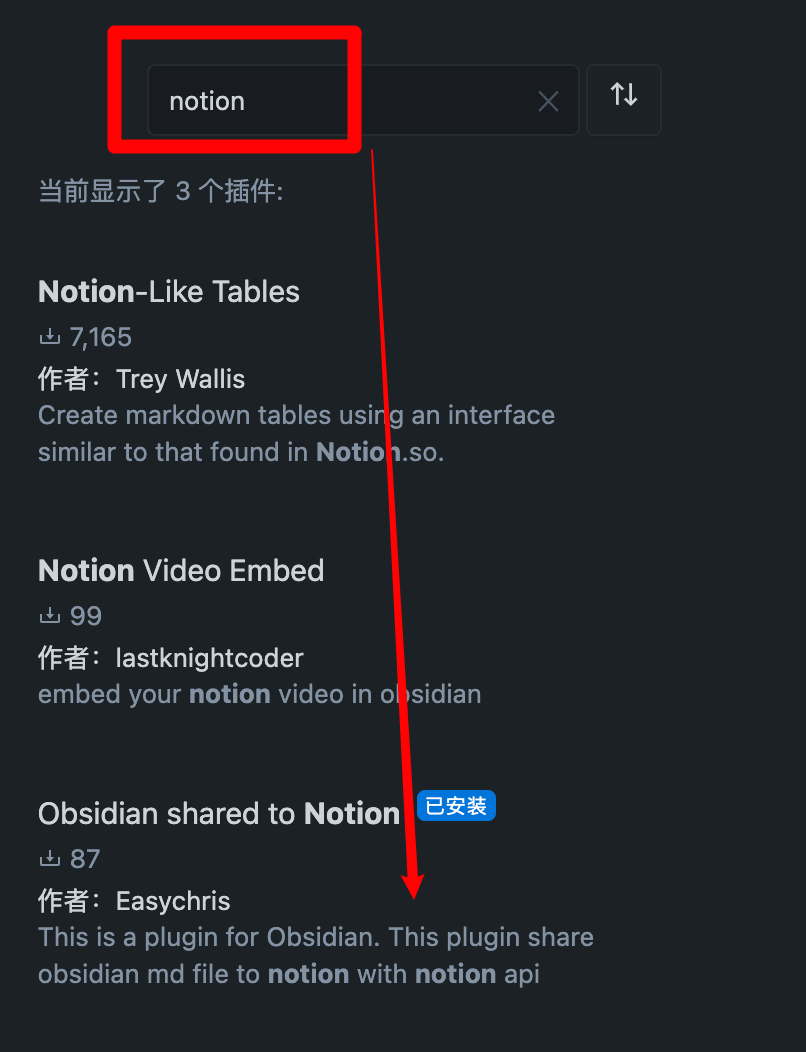
Open obsidian setting -> Add plugin -> Search -> notion
|
|
|
|
|
|
|
|
### BRAT
|
|
Enter `BRAT` into the plugin market center to find it.
|
|
Add `EasyChris/obsidian-to-notion` to the list of BRAT plugins that have been installed.
|
|
Return to the plugin center and turn it on.
|
|
### Manual installation
|
|
```
|
|
cd YOUR_OBSIDIAN_FOLDER/.obsidian/plugins/
|
|
git clone https://github.com/EasyChris/obsidian-to-notion.git
|
|
```
|
|
|
|
|
|
## Apply Notion API
|
|
Official reference documentation: [https://developers.notion.com/docs](https://developers.notion.com/docs)
|
|
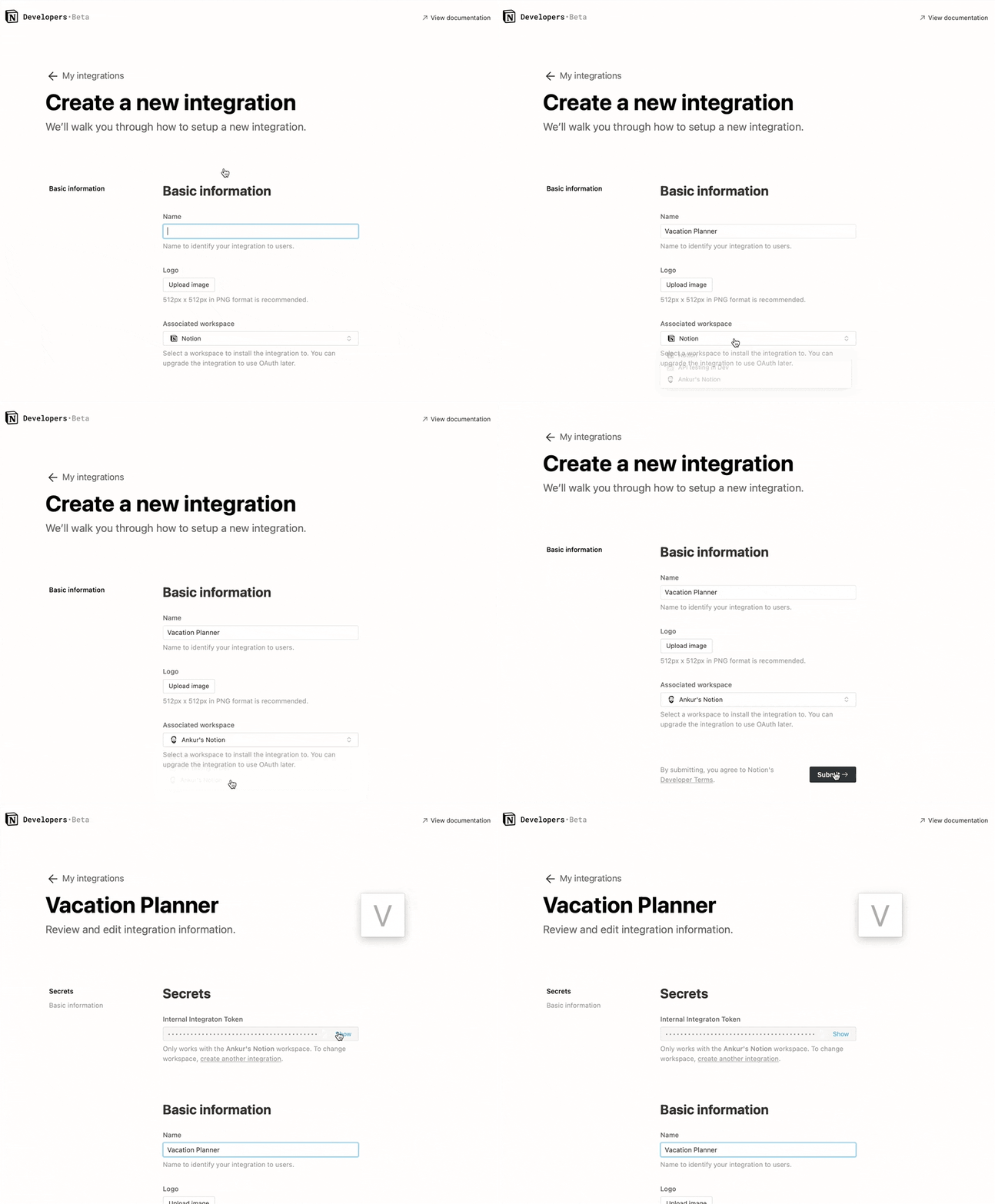
### Step 1: Create integration.
|
|
Go to [https://www.notion.com/my-integrations](https://www.notion.com/my-integrations)
|
|
Once created, copy `secrets toekn`
|
|
|
|
|
|
#### Note:
|
|
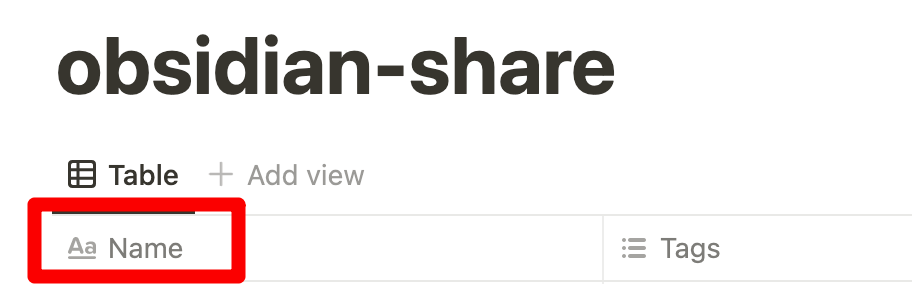
database first custom name must be "Name", otherwise sync to notion will be failed
|
|
|
|
|
|
|
|
|
|
|
|
### Step 2: Share a database with your integration
|
|
Create a new page (with public permissions)
|
|
Create a new database in the page -> you need `full page database`
|
|

|
|
|
|
Add `integration` to your new database
|
|
|
|

|
|
|
|
### Step 3: Copy the database ID
|
|
|
|
```
|
|
https://www.notion.so/myworkspace/a8aec43384f447ed84390e8e42c2e089?v=...
|
|
| --------- Database ID --------|
|
|
|
|
```
|
|
|
|
|
|
|
|
## Open the plugin configuration
|
|
Fill the configuration with the `NOTION_API_KEY` and `DATABASE_ID` you got
|
|

|
|
|
|
## Upload file content to notion
|
|
Click the upload notion button
|
|

|
|
A share link will be automatically generated after successful upload
|
|

|
|
|
|
|
|
## Banner URL [option]
|
|
Banner url must be a image url like: https://i.imgur.com/xxx.jpg
|
|
If you don't want to use banner, leave it blank
|
|
|
|
|
|
## Convert Tags [option]
|
|
Transfer the Obsidian tags to the Notion table.
|
|
It requires the column with the name 'Tags'.
|
|

|
|
|
|
Add tags to your notion page
|
|
|
|

|
|
|
|
* open plugin convert tags
|
|
|
|

|
|
|
|
* add tags in the head
|
|
|
|
```markdown
|
|
---
|
|
tags: [tag1,tag2]
|
|
---
|
|
|
|
this is test tags
|
|
|
|
```
|
|
|
|
|
|
```markdown
|
|
---
|
|
tags:
|
|
- tag4
|
|
---
|
|
|
|
this is test tags
|
|
|
|
```
|
|
|
|

|
|
|
|
Thanks for [@jannikbuscha](https://github.com/jannikbuscha) contribution
|
|
|
|
|
|
## Notion ID [option]
|
|
Notion ID is the your notion site ID that you want to share the file to.
|
|
if you don't write it, notion will share to the default link like:
|
|
https://www.notion.so/myworkspace/a8aec43384f447ed84390
|
|
that visit this page need to redirect to your site url
|
|
if you write the Notion ID, it will share to the page link like:
|
|
https://your_user_name.notion.site/myworkspace/a8aec43384f447ed84390.
|
|
The visiter don't need to redirect url.
|
|
|
|
|
|
|
|
## Sync image to Notion
|
|
|
|
To sync images to your oss or cos bucket, use the [Obsidian Image Auto Upload Plugin](https://github.com/renmu123/obsidian-image-auto-upload-plugin).
|
|
|
|
|
|
|
|
# Development
|
|
|
|
```
|
|
git clone https://github.com/EasyChris/obsidian-to-notion.git
|
|
yarn install
|
|
yarn dev
|
|
```
|
|
|
|
## Release
|
|
|
|
```
|
|
node update-version.js
|
|
./release.sh
|
|
```
|
|
```
|
|
|
|
|
|
|
|
|
|
# Thanks
|
|
[Development Process | Obsidian Plugin Development Documentation](https://luhaifeng666.github.io/obsidian-plugin-docs-zh/zh/getting-started/development-workflow.html)
|
|
|
|
[GitHub - devbean/obsidian-wordpress: An obsidian plugin for publishing docs to WordPress.](https://github.com/devbean/obsidian-wordpress)
|
|
|
|
[GitHub - obsidianmd/obsidian-api](https://github.com/obsidianmd/obsidian-api)
|
|
|
|
[GitHub - Easychris/obsidian-to-notion: Obsidian Weread Plugin is an plugin to sync Weread(微信读书) hightlights and annotations into your Obsidian Vault.](https://github.dev/zhaohongxuan/obsidian-weread-plugin)
|
|
|
|
[GitHub - Quorafind/Obsidian-Memos: A quick capture plugin for Obsidian, all data from your notes.](https://github.com/Quorafind/Obsidian-Memos)
|
|
|
|
[https://github.com/jannikbuscha/obsidian-to-notion](https://github.com/jannikbuscha)
|
|
|
|
# License
|
|
GNU GPLv3
|